Showing posts with label wis. Show all posts

4.20.2023

MB Star WIS ASRA Icon Gray Solution

Problem:

I have a problem with 03/2023 mb star xentry WIS software. ASRA icon is gray. Any solution?

MB Star WIS ASRA Icon Gray Solution 1

Solution:

Go to Settings, select the language as English or other languages. Don't choose language as US English. 

MB Star WIS ASRA Icon Gray Solution 2


3.19.2017

FAQ 2016 MB Star SD Connect C4 Xentry DAS

Here are the most frequently-asked questions from MB Star diagnosis SD connect C4 diagnostic scanner users and professional answers from engineers working for mbstartool.com. Hopefully, it helps those in trouble.

Q: How to change the Xentry language?
A: Go to Setup, select Setting language, then choose a language and click on Accept.
change-xentry-language
Q: How to setup the DAS language?
A: Go to DAS Properties. In the Target, change the last two letters (which is the first two letters of the language). Then click on OK.
change-das-language
Q: Xenry language error: A fault has occurred.
A: Change the PC date and time to be the same as the Xentry version.E.g. Your Xentry is version 2015.09, you need set up 2015.09.05 on your PC.
a-fault-has-occurred
Q: Fault (30.3) pops up after DAS activation. No valid DAS license; DAS will now be closed.
A: Go to local disk C:/programme files/Mercedes-Benz/StartKeyCenter2; find our StartKeyCenter.exe.
If DAS doesn’t expire, just change the bin file in C:/programme files/Mercedes-Benz/DAS
If DAS expires, you need Lan-id to activate DAS
No-valid-DAS-license
No-valid-DAS-license-2
Q: Xentry cannot run, the icon displays then disappears.
A: Change the PC date and time to be the same as the Xentry version;
If it does not work, replace the bin file in C:/programme files/Mercedes-Benz/DAS (the bin file differs from Xentry versions)
If all above fails, send the Mercedes software hard disk to the vendor to re-copy files.
xentry-cannot-run
Q: MB SD connect c4 firmware files are lost and WIFI cannot be set up.A: It means your sd connect firmware files are deleted and you need update sd c4 firmware.
Files need to update (ORDER!!!!!!):
02_CSD_2_10.zip
01_Boolimage_2_3.zip
03_PmPic29_Cpld23.zip

Sd connect c4 firmware update manual:

Note: please prepare new batteries and an OBD cable for use; if it fails to connect to the vehicle, replace it with the OBD 12V power; otherwise, it would pop up error 662 (update fails.)
sd-connect-c4-firmware-update-1
sd-connect-c4-firmware-update-2
sd-connect-c4-firmware-update-3
sd-connect-c4-firmware-update-4
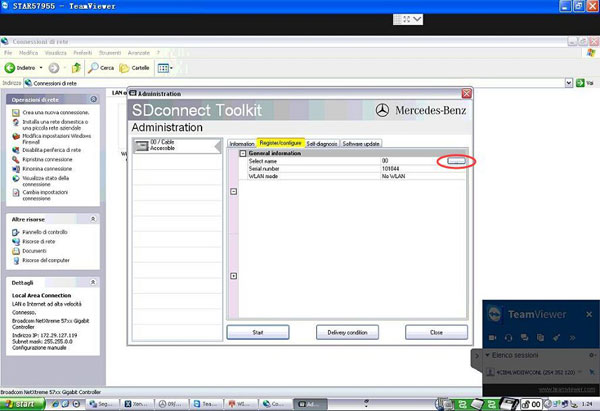
Q: SDconnect Tool kit appears Error 749 in Administration.Due to network problems, no connection to the SDconnect can be establish (749)No SDconnect is selected or the desired SDconnect cannot be selected
A: It results from incorrect IP setup. Please go to the network connect to WLAN set up IP:172.29.127.119 
SDconnect-Tool-kit-error-749
Q: Xentry error 2221-45: No access authorization code![2221-45] No access authorization for XENTRY diagnostics was found on the server. You must contact the user help desk.
A: Go to C:/programme files/Mercedes-Benz/Xentry/fusoko/eclipse/plugins; delete the file “com.damler.xentry.diagservice_1.6.0.201607181047”
Xentry-error-2221-45
Xentry error 2221-45-solution
Q: Xentry cannot open for use even reopen Xentry or restart the PC after activation.No access authorization code! You must contact the user help desk.
A: Go to C:/programme data/LicDir; delete lic-key2.dat
Open StartKeyCenter on Desktip; activate Xentry
Get a new lic-key2.dat after Xentry activation; copy and paste lic-key2.dat; then rename it as “lic-key2.x4711” (setup the file properties to Read Only)
No-access-authorization-code
Q: EWA-NET file cannot start. HTTP Status 500-Servlet execution threw an exception.
A: Go to the Start menu, then EWA-NET Admin ToolIn EWA Admin Tool, Server, EPC, WIS all should start (if they have started yet, pls. stop and restart)Server, EPC, WIS restart, reboot the PC, then open EWA-NET to login
ewa-cannot-start
epc-not-start-solution-1
epc-not-start-solution-2
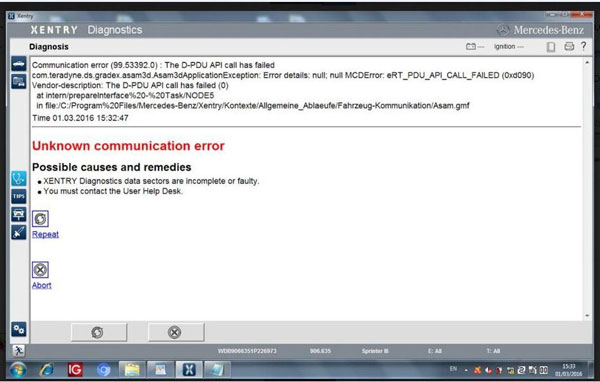
Q: Xenry Error (1.2)-2.503.13003:Initialization of diagnosis multiplexer failed
Possible causes:
The link between the diagnosis multiplexer an the diagnostic socket is interrupted
The link between the diagnosis multiplexer an the diagnostic unit is interrupted.
The voltage supply at the diagnostic socket (circuit30 and (or) circuit31)is fault.

Note:When using SD connect c4 multiplexer, check the connection status using the Toolkit.
A: check the connection of the cable and the car;
Then check the wired&wireless IP setup
Then check the Mercedes software; it’s MB SD C4 software, not Star C3
If all ok, it may result from the SD connect c4 mux or the cable
Initialization-of-diagnosis-multiplexer-failed
xentry-communication-error
BIG THANKS to engineers at mbstartool.com.

8.23.2016

EPC.net Internet Explorer cannot display solution

Here is the engineer solution to Mercedes-Benz MB Star diagnosis EPC.net software “Internet Explorer cannot display the webpage” solution.

Problem:
I have activated the 2016.05V EPC WIS software, but the Star diagnosis EPC.net online cannot run on IE explorer, it said “Internet Explorer cannot display the webpage”
Internet Explorer cannot display the webpage
Engineer solution:
Go to Windows Start Menu>open EWA>run EWA Admin Tool
EWA-admin-tool
Open Server,EPC,WIS one-by-one to check which software is not run.
Enable these 3 options.
Then restart the computer.
Open Server,EPC,WIS
Run EPC.net software again.

If you had EWA Client Tools error “Application blocked by security settings” after activation, then do following settings:
Application blocked by security settings

Go to Control Panel->find JAVA control panel->select Security tab->manually set the security level to lowest level.
java control panel

Then EPC should run without problem.
http://blog.mbstartool.com/2016/08/23/epc-net-not-display-webpage-solution/

7.06.2016

DAS Xentry working but WIS not installed solution

I have the problem with WIS standalone installation
Version: DAS 012012, MB Star C4
LanID: 080002AF5490
1) Keys; checked and used 2 different keys, they are all - saved successfully
2) WIS is 012012
3) Modifyed d2ksetup.ini
4) Running sdswitch.exe
trying to install on "clean" system, Xentry DAS is working, but WIS (surprisingly) I cannot install.

Solution found!
Problem only in permission on folder e:\wis
You need to do:
1) Right click on folder WIS disc E:
2) Select "Sharing and Security" menu
3) Click on Security tab
4) Select "Users" in "Group or user names:" list
5) in list "Permission for Users" check "Full control"
6) Press OK
and you done!

WIS installation reference:

Easiest way to avoid installation problem:
To buy Mercedes software HDD or SSD from  from http://www.mbstartool.com/wholesale/mb-star-software/
- all software pre-installed on the disk before delivery

http://blog.mbstartool.com/2016/07/07/xentry-das-working-but-wis-not-installed/

7.03.2016

How to print Mercedes WIS as print PDF

How much do you know about Mercedes WIS (workshop information system) print function? All useful tips are offered here by experienced users. To print Mercedes WIS, that is:
When the Print window pops up, check print to file, name the file, then you can copy and paste the file from the VM to the native system. If that doesn’t work you can create a shared folder (between the VM and host system) and print to it. Hope some of this helps

Where to get WIS software?
Get MB STAR C3, SD connect c4 software from a credible web, like mbsartool.com.
Note that many free WIS usually will expire in the near future or not full info there.

Is there any way I can download the docs and save them in soft form?
Go to print them and then change it from your printer to PDF printer in the menu.

What is Print function?
The “Print Functions” submenu enables a direct selection of the area of the document to be printed.
“Print Functions” window when printing out a wiring diagram
wis-print-window-1
i . All information can be printed.
. A page break generally follows before or after a picture or on a table line.
. The number of screen pages is not identical to the number of pages printed.

“Print Functions” window when printing out a wiring diagram:
Whole document – Prints the document from the first page to the last.
Screen – Prints the mask which can be seen on the screen.
Pages – Activates the “fm”, “to” input boxes.
Scale in % – For entering a scale in %.
Example: If you wish to print out four pages with a scale of 100 %, the printout can be reduced
to two pages if scaled to 50 %. The wiring diagram is then correspondingly smaller on the printout.
On the other hand, a very small wiring diagram can be shown three times larger on the printout
with a scale of 300 %.
i This function is only offered for printing out wiring diagrams.
Fit To Page – The wiring diagram is scaled in such a way that the entire wiring diagram is printed out on one
page.
i This function is only offered for printing out wiring diagrams.
fm, to – For entering specific page numbers.
Cover page – Prints in addition a cover page with the information: Name, user, document number, document title and validation.
i With wiring diagrams, the legend for the wiring diagram is also printed.
Print – Opens the print option window.
Continue – Closes the “Print Functions” window.

What is needed to print directly from WIS as well as print pdfs?
Print via Cute PDF
Windows 7 with standard printer drivers. An example pdf is attached.

How do you print?
Click the little printer sign and then a box opens and you choose parts list or picture, then either print onto paper or as a PDF.

How to setup a portrait or landscape format when print?
After calling the Print Functions using “Document Functions/Print”, a default Print option window is opened as well. This is to be used mainly for setting a portrait or landscape format.
The following settings are possible:
. Printer
. Paper size
. Page format
. etc.
The printer driver “HP5SIMX” has been used as an example.
The Print option window may look different depending on the printer driver being used.
An overview of the most important functions:
i It is assumed you have basic knowledge of Windows. The full functions of the Print option window can be found in the usual manuals.
wis-print-window-2
1 Print range – The setting “All” is always active and cannot be changed.
i Restriction to specific pages is set in the “Print Functions” WIS mask and has a limited function
at the present time.
Properties – Calls the properties for the printer selected.
Alignment – For setting the paper format desired (portrait or landscape).

i . If individual characters are not printed out as shown on the screen, make sure in the printer properties that True Type fonts have been loaded in the printer as soft font.
. If the entire page is not printed, we recommend you reduce the graphics resolution until the whole page is printed
correctly.
. You must make sure that there are sufficient system resources available for the document and screen print. A graphics printout with a higher resolution may produce better quality pictures but may also lead to system errors
if there are not enough system resources.
. Please make sure of the following when setting a higher resolution:
— The printer has sufficient main memory.
— Workstation/Server have sufficient disk memory for temporary external files.
— The workstation has sufficient main memory/virtual memory to be able to perform the graphics editing.

What should you pay attention to?
Keep in mind the virtual PC has a control panel, just like the original OS, where you select the default printer. Just pick PDF as the default, and you will produce legible PDF’s whereever you want to save them. Screenshot below of the print dialogue within virtual Windows XP plus attached PDF produced in this manner. My print dialog shows six printer choices, your mileage may vary…
print-WIS
Whenever I try to create or print files some symbols don’t get converted right or when I try to print directly from wis, some symbols don’t get printed right. How to fix it?A quick guess would be that you have a limited number of fonts installed on your computer or a skewed font substitution table.

Microsoft KB article on font substitution
Adobe article on font substitution
Microsoft makes a library of common web fonts available.

You might also want to check that your local printer is properly configured and has the latest driver.

6.30.2016

How to install WIS EPC 2015.10 for SD Connect C4

This is the instruction on how to install Workshop Information System V2015.10 for 2015.09 star diagnostic mb sd connect c4 multiplexer.

Free download MB WIS ASRA 10/2015 FULL Torrent:
https://www.dropbox.com/s/bwotrms6vi7o3vg/WIS_1015.zip?dl=0
Version: 3.11.12.0
Language: Multilingual
Crack: None
Description: Mercedes-Benz WIS / ASRA Information Base repair of cars and trucks, Mercedes-Benz buses for the European and American markets.
Extras. Info.: This is a full release, suitable for installation “from scratch.”

WIS installation instruction:
Install Admin Tool
Select start
2015-WIS-installation(1)
Internet Explorer prompt: select Yes.
Select Start registration.
2015-WIS-installation (2)
Select Run at the bottom prompt.
Installing …
Select a language and click OK.
Click Next.
Click Next.
Installing EWA…
2015-WIS-installation (3)
Click Next.
Finished installing EWA Admin Tool, and click Finish.

Check WIS Startkey
Select Startkey and copy NAC address to ID in HP-EVA Keygen interface.
2015-WIS-installation (4)
Set the Expiration dates.
Copy EPCnet to its Startkey, and WISnet to its Startkey.
2015-WIS-installation (5)
Close HP-EVA Keygen interface.
Click Save in EWA Admin Tool.
Startkey successfully saved. Click Exit.

Install WIS database
Select WIS and click Install WIS database.
2015-WIS-installation (6)
Prompt: WIS installation
1 check WIS Startkey
2 check WIS information medium
3 copy all WIS files to hard disk
4 install new EWA software version (optional)
5 test new WIS database
6 install new WIS database
7 carry out correction of work steps
8 set up latest WIS documents
2015-WIS-installation (7)
Installing WIS database…
Click Continue.
Click Continue.
Click Confirm.
Click Continue.
Click Continue.
Click Continue.
WIS database installation completes.
Click Exit.
Select Yes to exit Admin Tool.

Set up EWA
Select Favorites>>EWA net>>EWA net.
2015-WIS-installation (8)
Enter User and Password (admin, admin) to Log in.
Change password and click OK.
Select Workshop.
Workshop: 123
Country: U.S.A.(705)
Click Save.
2015-WIS-installation (9)
Select Group>>Administrator group.
2015-WIS-installation (10)
Select EPC access authorization: As workshop access authorization
Select WIS/ASRA access authorization: As workshop access authorization
Click Save.
2015-WIS-installation (11)
Click OK.

Run EWA
Again, select Favorites>>EWA net>>EWA net.
Log in with new password.
Click WIS/ASRA.
2015-WIS-installation (12)
Close the interface of “ WIS/ASRA-what’s new…”
2015-WIS-installation (13)
WIS diagnostic interface…
2015-WIS-installation (14)
(note: Mercedes software 2015.09 for MB SD C4 at mbstartool comes with pre-installed WIS, no need to install yourself)