11.18.2018

Vediamo cannot connect to SD Connect C4 Solution

Problem:
I have SD Connect C4 multiplexer.
It works great with Xentry with cable connection.
O/S: Windows 7 64 Bits.

But Vediamo V05.00.05 has issue connecting to MB SD C4.
After opened up Vediamo, I press on update. Then, i got error message

"The Caesar-Hardware Part A / Part C (ISA) / Part Y is not supported under Windows (7) - 64Bits."
vediamo-cannot-connect-to-sd-c4
Possible reason :
Vediamo is not compatible with Windows 7 64 bit.


Solution 1:

Solution 1 is provide by customer. 

"I just fixed it.

There is no Part D needed. or Part ...etc.

All i did is, change Device ID 0 to 01 in INI file
Because my SD C4 is 01 .

I modified Vediamo_c.ini in ProgramData/Vediamo/Config

You will see 3rd Line from top, DefaultDeviceNumber=xx

Change xx to your device number.

Hope this helps!!


Solution 2:

If solution 1 does not work, please change another laptop with Windows 7 32-bit. We have tested Vediamo and MB SD Connect C4 on 32bit system perfectly. 

www.obdii365.com

http://blog.obdii365.com/2018/11/19/solve-vediamo-not-connect-to-sd-connect-c4-problem/

How to replace dead Xentry Connect SSD

To replace dead SSD or recover damaged one, or replace old slow SSD you need to follow these easy steps:

1. Attach a new SSD to PC, initialise in with MBR partition scheme, format to NTFS
2. The new disk will appear in Explorer under some letter (let's say disk F:\)
3. Save MBR_C.bin file from any Xentry Connect update disk to your PC 
4. Download win32imager software and run it
5. Choose our new SSD disk F:\ in the Device section (right-top dropdown menu)
6. Choose MBR_C.bin file in Image File section
7. Press write button. The software will overwrite the disk MBR to original Xentry Connect one
8. Close win32imager software
9. Open Explorer and you will see 4 new partitions, Windows will report that it can't read them and offer to format.
10. Format each partition to NTFS file system, no need to choose any partition label.
11. Make file system check on each partition after format. Right click on disk -> properties -> tool -> check now
12. Disconnect SSD from PC using safe-remove
13. Put SSD back to Xentry Connect and perform update as usual


I have already replaced more than 10 SSDs for my customers. I've used Samsung 860 EVO 256 GB drive.
You must use 240 GB or 256 GB SSD.

Q:
did you ever managed to make firmware update of XentryConnect, 
like firmware update of SDConnect by Toolkit?

A:
Xentry Connect firmware update is done automatically when you update whole system, and doing first run.

11.13.2018

How to activate SD connect C4/c5 to work with Mitsubishi Fuso?

This is for Mitsubishi Fuso owners:
Possible to use FUSO Xentry diagnostics with a cloned SDconnect C4 or C5?
What can I do if I have FUSO Xentry diagnostic software?
fuso-xentry-diagnostic-software-1
Obdii365.com tech support:

With the genuine, definitely Yes. But you will spend a lot with it.
With the clone, possible. You should have a decent diagnostic tool for Mitsubishi trucks. FYI, not all C4/C5 cloned units can work with it.
The decent Mitsubishi Fuso diagnostic tool should be
fuso-xentry-c5
It’s kind of different from the normal SD connect C5 for Mercedes:
xentry-connect-c5
Mitsubishi Fuso diagnostic software download:
VERY VERY VERY IMPORTANT:
You can have the same interface with normal SD connect C4/C5.
BUT actually Mitsubishi Fuso diagnosis doesn’t work.
This is the only version confirmed to work with mitsubishi!
fuso-xentry-diagnostic-software-2
It can work for FUSO Mitsubishi, Cobus, Mercedes-Benz, Smart, Maybach, Setra, Bharat-Benz, FotonDaimler , while normal SD connect C4/C5 software only work for Mercedes-Benz and Smart.

Mitsubishi Fuso diagnostic software:
Version: 09.2018
Language:
English,Bulgarian, Danish, Greek, French, Spanish,Italian, Korean, Polish, Romanian, Serbo-Croatian, Swedish, Chinese, Czech, German, Finish, Hungarian, Japanese, Dutch, Portuguese, Russian, Turkish, Slovenian

Mitsubishi Fuso diagnostic functions:
  • Read and Clear Codes
  • View live data
  • View lifetime and trip totals
  • Perform bi-directional diagnostic commands such as DPF regeneration, re-learn commands, injector tests, and more

Mitsubishi Fuso vehicle coverage:
covers Mitsubishi model from year 2012 to year 2016

Mitsubishi Fuso Xentry Connect C5 diagnostic connector:
1pcs X Fuso Connect Interface C5 XENTRY
1pcs X Fuso Harness (OBD 2)
1pcs X Fuso Lan Cable
fuso-xentry-connect-c5-1

fuso-xentry-connect-c5-2

fuso-xentry-connect-c5-3

fuso-xentry-connect-c5-4

fuso-xentry-connect-c5-5

This multiplexer now is able to connected with a Lan cable for wireless diagnosis
The Connector adopts military quick swap technology, it can support 10,000 times pull plug, more stable;
All core accessories come with the original new packing chip, and 24hours test, the quality guarantee of the products

11.05.2018

How to: DAS does offline coding & programming

Mercedes offline programming/coding tips and guides:

Offline coding:
SCN or CVN coding was added to the cars back in 2003 if not earlier . The idea of OFFLINE coding was to be able to make SCN codings when you don’t have an internet connection at your workshop to be able to perform this online. In both cases an SCN or CVN coding was required.
Let’s not confuse OFFLINE coding with simple CODINGS !
Codings can be done with regular DAS or Developer DAS more deeply. Coding does not imply that you have to replace your unit software completely. If you have to make an Offline coding this implies to flash your unit with an updated software version or at least the same version which you have already (not sure if you will be able to downgrade your software) and then SCN code that one to be activated in your car. I’m not aware of any car which can be OFFLINE coded without the request for an SCN code.
The only good point here is the time needed to do this. Yes , you can make OFFLINE coding with your system and then go back to the dealer and ask them to make an SCN coding for you…however are u sure they will not charge you the same amount as if it was done in their workshops ?

The internal VIN of this car (e.g.w211): is WDB2110261AXXXXXX

The first letter of the external VIN after “WDB” gives the body style, like
– U for MB means 211
– F means Sedan
– next two digits are the model within the body type, seems to be a direct copy from the internal VIN
– next digit is about the SRS system, I’ve found explanations up to the letter F, so this car must have more SRS equipment than known when my reference was drafted
– position 9 is a check digit and the tenth digit comes from the model year.
It is much easier to find this if you enter the external VIN to EPC and let it decode the internal VIN for you. Then pick up digits 4-9.


Ps. 17-digit code & 6 digits of numbers
vin-to-epc-digit-number-1

vin-to-epc-digit-number-2

vin-to-epc-digit-number-3

Office programming:

If you want to program ecu ‘offline’, there are several options:
1. In DAS, you can program ecu’s offline. (In xentry, you have to buy xentry calculator.)
2. Vediamo is the way to go to program ecu offline and is used by daimler factory
3. If you want only for 204.041 as above, you can try to use 204 in DAS. and there is free offline programming
between those three options, vediamo is the best and can be used for 99% vehicle’s model

Noe that: For those with Star diagnosis for 100usd around. DAS is your way to go.

DAS (older models before 2011, but still most cars communicate through this program)
Xentry (new model cars 2011-2016)
If you set it up correctly, you can program offline in DAS only. Then if we need to go online with DAS we switch the modified flash folder to the original.
Xentry there is no offline programming, only online. Obviously, you need to have login and pass to go online.
Btw, offline programing is an ancient way of the service,..nowadays its better to use online services,…its safety,..and quickly

The last, how to enable DAS for offline programming:
Option 1: (try on your own risk)
It’s very simple to enable “Offline” programming in newest DAS version

copy this file to
F:\Programme\DAS\trees\pkw\flashen\ini
(click yes, to replace existing).
And Be Happy !!!

if you not have this function for any concrete car – check first six VIN digits for this car, and add to this file in model section.
for sample – to enable option for WDD221054 – add text string to file :
221.054=YES

Option 2: (try on your own risk)
Open F:\Programme\DAS\trees\pkw\flashen\ini on the notepad and add ->
First of all
———-A451———-
451.331=YES
451.332=YES
etc
etc
etc

IMPORTANT!!!!!!!
The options above are diy solutions from DAS users.
TRY ON YOUR OWN RISK.
NO ONE HOLDS RESPONSIBILITIES FOR YOU.
If solutions above remain useless or you want a solution WITH SECURITY, please try option 3, the idiot solution.

Option 3: (use with relief and security)
Spend a little bit money on an enabled DAS for offline programming.
mb-sd-c4-offline-programming-1

mb-sd-c4-offline-programming-2

mb-sd-c4-offline-programming-3

mb-sd-c4-offline-programming-4

Though the DAS 2012.11 version is kind of old, this is the one we highly recommend. It has been tested for thousands of times on vehicles, verified to work definitely.

And it also can be come with the full package V2012.11 MB SD Connect C4 with DELL D630 laptop,very convenient for customer who do not have DELL D630 laptop or do not know how to install software correctly.

This will save a lot of time for urgent needs. That is, users can directly use this set for offline programming when they receive the package (including setup offline mode in old DAS software) and open the function. But they need set up WIFI and Lan cable connection by themselves if wanna do online programming.


In short,
For offline programming,
DAS 2012.11 is the best solution for old cars before 2010.

For online programming,
You can use the latest version 07.2018 or 09.2018 Xentry system for the old and new cars

10.12.2018

Benz R129 SL500 2001 DME Coding with MB Star HHT-WIN

Model:
Mercedes Benz SL500 (R129) 2001

Problem:
Made a key for a 2001 SL500, car ran fine for 2 days.. Then car won’t start..

Solution:
benz-r129-xprog-1

benz-r129-xprog-2

benz-r129-xprog-3

benz-r129-xprog-4

Took immo box out and read HC05 chip with xprog 5.55, data was garbled..
Tried writing data to two new/used immo boxes.. those were bad too..
julie-emulator-benz-r129-1

julie-emulator-benz-r129-2
Put Julie emulator on DME, a Bosch ME2.0, first try, the car started but no gas pedal, wrote data again and personalized DME, and it worked fine…
When checking DAS authorizations under actual values, make sure to hit the right arrow button, it shows the last authorization…

Procedure to personalize/code DME:
Device used:
MB Star diagnostic scanner SD Connect C4/C5 with software HHT-WIN (latest mb star software has HHT functionality)
mb-star-hht-win-benz-r129-dme-1

Connect C5 Xentry Connect multiplexer via WLAN cable and setup software on my a Dell laptop
Select vehicle model, Control Unit Groups->Drive->ME2-SFI-Motor electronics 2
mb-star-hht-win-benz-r129-dme-2

mb-star-hht-win-benz-r129-dme-3

DAS will automatically selects HHT-WIN
mb-star-hht-win-benz-r129-dme-4

Diagnostic multiplexer is being initialized
Select Actual values->Drive authorization
mb-star-hht-win-benz-r129-dme-5
mb-star-hht-win-benz-r129-dme-6

You can see engine control module  is not compatible nor identified
Engine cannot start either
mb-star-hht-win-benz-r129-dme-7
mb-star-hht-win-benz-r129-dme-8
Start coding
Select Control unit adaptations->Version coding->Read or carry out coding
mb-star-hht-win-benz-r129-dme-9

mb-star-hht-win-benz-r129-dme-10

mb-star-hht-win-benz-r129-dme-11
HHT-WIN displays coding number, coding unit number and chassis,and valid code numbers
mb-star-hht-win-benz-r129-dme-12

mb-star-hht-win-benz-r129-dme-13
Press YES to Transfer coding to new control module
Turn off ignition
mb-star-hht-win-benz-r129-dme-14

Replace old control module with new control module
Turn on ignition
Coding has been carried out
mb-star-hht-win-benz-r129-dme-15

mb-star-hht-win-benz-r129-dme-16
Identification is being carried out.
Engine control module is automatically inerlocked after 40 engine starts
mb-star-hht-win-benz-r129-dme-17

Engine starts
engine speed raise from o to 1250 rpm or so and the green indicators on MB SD C5 unit flash
mb-star-hht-win-benz-r129-dme-18

mb-star-hht-win-benz-r129-dme-19

Initiate interlocking
mb-star-hht-win-benz-r129-dme-20
mb-star-hht-win-benz-r129-dme-21

The control module is interlocked and permanently assigned to the vehicle
Switch off ignition
Turn on ignition
Now go back to check actual values
mb-star-hht-win-benz-r129-dme-22

mb-star-hht-win-benz-r129-dme-23
mb-star-hht-win-benz-r129-dme-24

Engine module is identified/interlocked and engine is able to start.
Done.

9.29.2018

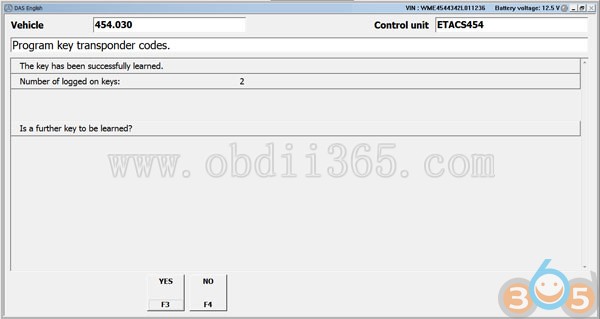
Smart 454 Key Programming offline with Super MB Star

The new released 2018.09 Super MB Star software adds lots of special functions, including  Password Free & OFFLINE key teach-in program transponder key on Smart SAM451 & ETACS454 2016-12 UP.

Note: Only Super MB Star software 2018.09 up  & Super MB Star C3 multiplexer will do. Normal 2018.09 mb star software does not have this feature.

Example: Smart 454 key programming
super-mb-star-smart-454-key-tech-in-1

Development data: Diagnosis to plant specifications
super-mb-star-smart-454-key-tech-in-2

Program key transponder codes
Insert key to be programmed into ignition switch and turn to ON position
Number of logged on keys: 2
Status:
A spare key (SUB) kley has been detected.
If programming is started now, the programmed key will become the new spare key (SUB key)
Press key F1 to interrupt the tech-in process.
Press key F2 in order to start the learning process.
super-mb-star-smart-454-key-tech-in-3
Switch off ignition and then switch on.
Press key F1 to interrupt the tech-in process
super-mb-star-smart-454-key-tech-in-4
The ignition must be switched on again within 20s, otherwise the teach-in process will be aborted.
super-mb-star-smart-454-key-tech-in-5

The key has been successfully learned.
Insert key to be programmed into ignition switch and turn to ON position
The ignition must be switched on again within 20s, otherwise the teach-in process will be aborted.
Switch off ignition and then switch on.
super-mb-star-smart-454-key-tech-in-6
super-mb-star-smart-454-key-tech-in-7
Carry out control unit assignment
super-mb-star-smart-454-key-tech-in-8
Initial startup of the control unit is completed
super-mb-star-smart-454-key-tech-in-9
FLY:
What’s new in 2018.09 Super MB Star and what’s the different between new super mb star and normal mb star software?
Please check detail guide here: