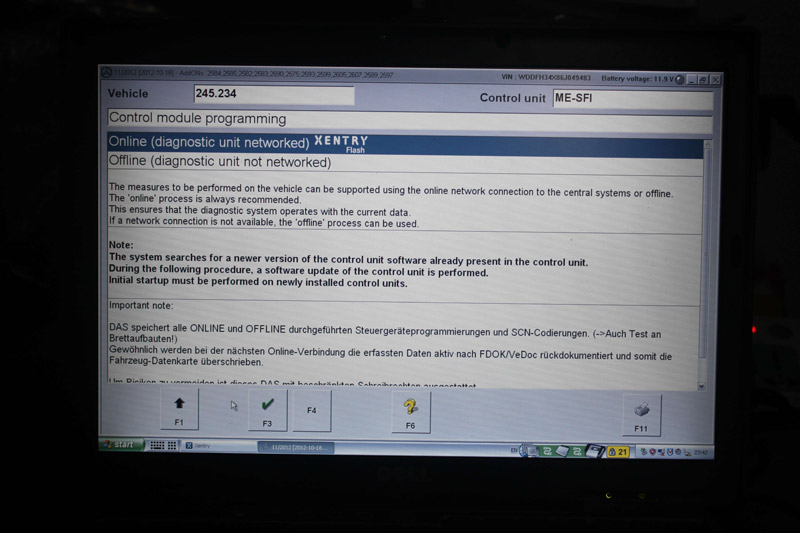
Mercedes offline programming/coding tips and guides:
Offline coding:
SCN or CVN coding was added to the cars back in 2003 if not earlier . The idea of OFFLINE coding was to be able to make SCN codings when you don’t have an internet connection at your workshop to be able to perform this online. In both cases an SCN or CVN coding was required.
Let’s not confuse OFFLINE coding with simple CODINGS !
Let’s not confuse OFFLINE coding with simple CODINGS !
Codings can be done with regular DAS or Developer DAS more deeply. Coding does not imply that you have to replace your unit software completely. If you have to make an Offline coding this implies to flash your unit with an updated software version or at least the same version which you have already (not sure if you will be able to downgrade your software) and then SCN code that one to be activated in your car. I’m not aware of any car which can be OFFLINE coded without the request for an SCN code.
The only good point here is the time needed to do this. Yes , you can make OFFLINE coding with your system and then go back to the dealer and ask them to make an SCN coding for you…however are u sure they will not charge you the same amount as if it was done in their workshops ?
The internal VIN of this car (e.g.w211): is WDB2110261AXXXXXX
The first letter of the external VIN after “WDB” gives the body style, like
– U for MB means 211
– F means Sedan
– next two digits are the model within the body type, seems to be a direct copy from the internal VIN
– next digit is about the SRS system, I’ve found explanations up to the letter F, so this car must have more SRS equipment than known when my reference was drafted
– position 9 is a check digit and the tenth digit comes from the model year.
– U for MB means 211
– F means Sedan
– next two digits are the model within the body type, seems to be a direct copy from the internal VIN
– next digit is about the SRS system, I’ve found explanations up to the letter F, so this car must have more SRS equipment than known when my reference was drafted
– position 9 is a check digit and the tenth digit comes from the model year.
It is much easier to find this if you enter the external VIN to EPC and let it decode the internal VIN for you. Then pick up digits 4-9.
Ps. 17-digit code & 6 digits of numbers


Office programming:
If you want to program ecu ‘offline’, there are several options:
1. In DAS, you can program ecu’s offline. (In xentry, you have to buy xentry calculator.)
2. Vediamo is the way to go to program ecu offline and is used by daimler factory
3. If you want only for 204.041 as above, you can try to use 204 in DAS. and there is free offline programming
between those three options, vediamo is the best and can be used for 99% vehicle’s model
1. In DAS, you can program ecu’s offline. (In xentry, you have to buy xentry calculator.)
2. Vediamo is the way to go to program ecu offline and is used by daimler factory
3. If you want only for 204.041 as above, you can try to use 204 in DAS. and there is free offline programming
between those three options, vediamo is the best and can be used for 99% vehicle’s model
Noe that: For those with Star diagnosis for 100usd around. DAS is your way to go.
DAS (older models before 2011, but still most cars communicate through this program)
Xentry (new model cars 2011-2016)
Xentry (new model cars 2011-2016)
If you set it up correctly, you can program offline in DAS only. Then if we need to go online with DAS we switch the modified flash folder to the original.
Xentry there is no offline programming, only online. Obviously, you need to have login and pass to go online.
Btw, offline programing is an ancient way of the service,..nowadays its better to use online services,…its safety,..and quickly
The last, how to enable DAS for offline programming:
Option 1: (try on your own risk)
It’s very simple to enable “Offline” programming in newest DAS version
copy this file to
F:\Programme\DAS\trees\pkw\flashen\ini
(click yes, to replace existing).
And Be Happy !!!
if you not have this function for any concrete car – check first six VIN digits for this car, and add to this file in model section.
for sample – to enable option for WDD221054 – add text string to file :
221.054=YES
Option 2: (try on your own risk)
Open F:\Programme\DAS\trees\pkw\flashen\ini on the notepad and add ->
First of all
———-A451———-
451.331=YES
451.332=YES
etc
etc
etc
First of all
———-A451———-
451.331=YES
451.332=YES
etc
etc
etc
IMPORTANT!!!!!!!
The options above are diy solutions from DAS users.
TRY ON YOUR OWN RISK.
NO ONE HOLDS RESPONSIBILITIES FOR YOU.
If solutions above remain useless or you want a solution WITH SECURITY, please try option 3, the idiot solution.
Option 3: (use with relief and security)
Spend a little bit money on an enabled DAS for offline programming.


Though the DAS 2012.11 version is kind of old, this is the one we highly recommend. It has been tested for thousands of times on vehicles, verified to work definitely.
And it also can be come with the full package V2012.11 MB SD Connect C4 with DELL D630 laptop,very convenient for customer who do not have DELL D630 laptop or do not know how to install software correctly.
This will save a lot of time for urgent needs. That is, users can directly use this set for offline programming when they receive the package (including setup offline mode in old DAS software) and open the function. But they need set up WIFI and Lan cable connection by themselves if wanna do online programming.
In short,
For offline programming,
DAS 2012.11 is the best solution for old cars before 2010.
For online programming,
You can use the latest version 07.2018 or 09.2018 Xentry system for the old and new cars