Showing posts with label mb sd c5. Show all posts

2.28.2023

MB SD C4 vs VXDIAG vs Openport for Xentry

 Which is better Mercedes Benz MB Star diagnostic device? VXDIAG, MB SD C4 or OpenPort2 VCI?

MB SD C4 vs VXDIAG vs Openport

Openport 2.0:

The disadvantage of the connector is it falls of with constant use. We recommend openport with a gold connector.

openport with gold connector

There is a tutorial on how to solder it so that it is more stable. It is quite suitable for diagnostic, but risky for update modules for firmware.

How to Modify Tactrix Openport 2.0 Clone


It has small volume RAM, when coding some serious new module there maybe 51 encoding are written incorrectly. Because there is not enough operational memory in the original device (only 512 megabytes.).  What also you can say about it old vers. Openport cannot read well until 2005. We don’t recommend on old car at all.

There is no sense to connect modules ME28 E20 just does not see as well as SBC. Cars since 2005 are read without problems, all modules of W164, W221, does everything reads.
More about internet wanted to say guys are not afraid here is no internet all this is speculation.


Pros:

  • Good reasonably priced option if you don’t need to do any module updates.
  • Openport 2.0 is not limited on Can- Cars from 2006 and above!
  • useful for ECUs with CAN capability.
  • For normal troubleshooting and diagnosis, though, it rocks.

Cons:

  • you won’t be able to access K-Line ECU’s that are widely used in old K-line models
  • if you want to work with vediamo you can’t use vediamo 5 (4 can’t use smrd files) because vediamo 5 doesn’t support Passthru so your “stuck” with DTS Monaco
  • You’d better replace R1 by 47k for better operation and to avoid overheating.
  • You are risking of getting failed and then potentially bricking your ecu if need to do ECU SW updates.


Read more

Tactrix Openport 2.0 with Xentry Passthru Pros and Cons


VXDIAG VCX SE

Next we will take about vxdiag- a beautiful device well. We consider it the most versatile device for your money.
The truth has risen in price due to the increase cost.

When use this device, put in obd connector, connect the machine, computer and USB, and only then turn on the ignition in reverse order exactly the same turn off the ignition.
Pull out from the computer, remove the usb connector.  VXDIAG reads W223 well, read W213 pretty well.

The problematic pattern new xentry need to be latest drivers.


Pros:

  • compatible with both Passthru (as j2534 passthru device) and XDOS openshell (as C6 VCI)
  • The license, firmware can be updated in driver app, it is a lifetime license and its working with the new software
  • VCX SE is more stable than Tactrix openport clone but it is acting the same way J2534 protocol.
  • The main reason for buying vxdiag is that it has DoIP for new cars.
  • vcx se connects via WiFi and it’s very convenient. wlan connection is stable at a distance of up to 2 m.
  • there is already a Type C connector and it is held very tightly
  • firmware updatable
  • you can also use BMW and there are a lot of all sorts of programs that it supports
  • as much as modules can be scanned
  • Work best offline.

Cons: 

  • It does not support older models with K-line protocol, it is for 2005 up Mercedes.
  • Vediamo 5 needs special setting
  • Have to update vci firmware and C6 driver when new versions come out
  • not very good on Mercedes trucks

Read more:

How to Set up VXDIAG VCX SE Benz as Xentry Passthru Device?


MB SD Connect C4/C5 

Next device is C4. C4 also works well for older cars ME28 ME20. It is irreplaceable thing because it works great on cars before 2005.

But sometimes the new models does nto read very well, often does not seel all modules especially w223.
but this is enough for full car service and diagnostic function. It works great with DTS Monaco program which is wonderful works with sbf files with MRI.


Pros

  • works vehicle both new and old
  • The newer c4 muxes all typically have wifi.
  • The mux itself has a DHCP server inside and leases an IP address to the laptop.
  • You don’t have to install batteries for firmware update.
  • New cooler for long operation


Cons:

  • multiplexer and connector quality varies, some good, some poor

2.26.2023

How to Activate Benz w204 VGS3 on Mercedes W211?

 Tutorial: how to replace the transmission gearbox VGS3 TCU of a Mercedes Benz W204 by the one from a W211.


Tools used:

CGDI Prog MB or VVDI MB

FVDI/AVDI/SVCI 2020

MB Star diagnostic MB SD C4/C5


Main procedure:


Procedures:

Step 1. Renew VGS3

Connect VGS module with CGDI MB.

Activate Benz w204 VGS3 on Mercedes W211 1

Read this used VGS3, which comes from a Benz W204.

Activate Benz w204 VGS3 on Mercedes W211 2

Get Erase Password, then erase it.

Read again to make sure it is not personalized and not activated.


Step 2. Flash VGS3

Connect FVDI2014/AVDI/SVCI 2020 to module, run software

Select

E-class / CLK>>W211 (As of 06/2006)>>Gasoline

Go to “Electronic Transmission Control”.

Identification. Same part number in CG MB.

Activate Benz w204 VGS3 on Mercedes W211 3

Click “MAKE VIRGIN” to load CFF file.

Activate Benz w204 VGS3 on Mercedes W211 4

When we get VIN later, we can write VIN on “Adaptation”.

Activate Benz w204 VGS3 on Mercedes W211 5

Then it will become a real module of W211 E-class.


Step 3. Coding VGS3

Connect SD C4 to module, and open DAS.

Go to “Control Unit Version” menu, here coding is NO Value.

Activate Benz w204 VGS3 on Mercedes W211 6

Development data>>Control unit adaptation>> Control unit adaptation (Variant Coding)>>SCN Variantencoding VGS 73

Select “YE9M” and confirm.

Back to “Control Unit Version” menu,

Select

Actual Values>>Drive authorization

All protection is No.

Activate Benz w204 VGS3 on Mercedes W211 7

Step 4. Activate

Transmission installed in the vehicle, no feel on gear now.

On DAS, go to

Control units>>Drive>>Transmission>>Actual Values>>Drive authorization

All 4 protections are No, since we use Abrites and CGDI MB.

Activate Benz w204 VGS3 on Mercedes W211 8

Back to “Transmission” menu.

Switch up the car again.

Go to

Control unit adaptations>>Detach the transport protection of control module ETC, personalize or activate the control module

Activate Benz w204 VGS3 on Mercedes W211 9

Activate ETC.

Activate Benz w204 VGS3 on Mercedes W211 10

Switch off the car.

Check Actual Values again.

All Yes.

Activate Benz w204 VGS3 on Mercedes W211 11

Credits to hesham essam.


http://blog.obdii365.com/2023/02/26/replace-mercedes-w204-vgs3-by-one-from-w211/

12.25.2022

How to Solve Fail to Start MB Star Win10 HDD?

 Here comes the working solution to MB SD Connect C4/SD C5 Windows 10 HDD or SSD cannot start windows problem.

Solve Fail to Start MB Star Win10 HDD 1

Solution:

Power on and press F8 or F12 to choose “Troubleshoot” option (second option if it is Chinese system)

Solve Fail to Start MB Star Win10 HDD 2

Go to Advanced setting (second option)

Solve Fail to Start MB Star Win10 HDD 3

Choose Startup setting

Solve Fail to Start MB Star Win10 HDD 4

Solve Fail to Start MB Star Win10 HDD 5
Solve Fail to Start MB Star Win10 HDD 6
Solve Fail to Start MB Star Win10 HDD 7

Then press F4 to restart computer


Solve Fail to Start MB Star Win10 HDD 8

Solve Fail to Start MB Star Win10 HDD 9

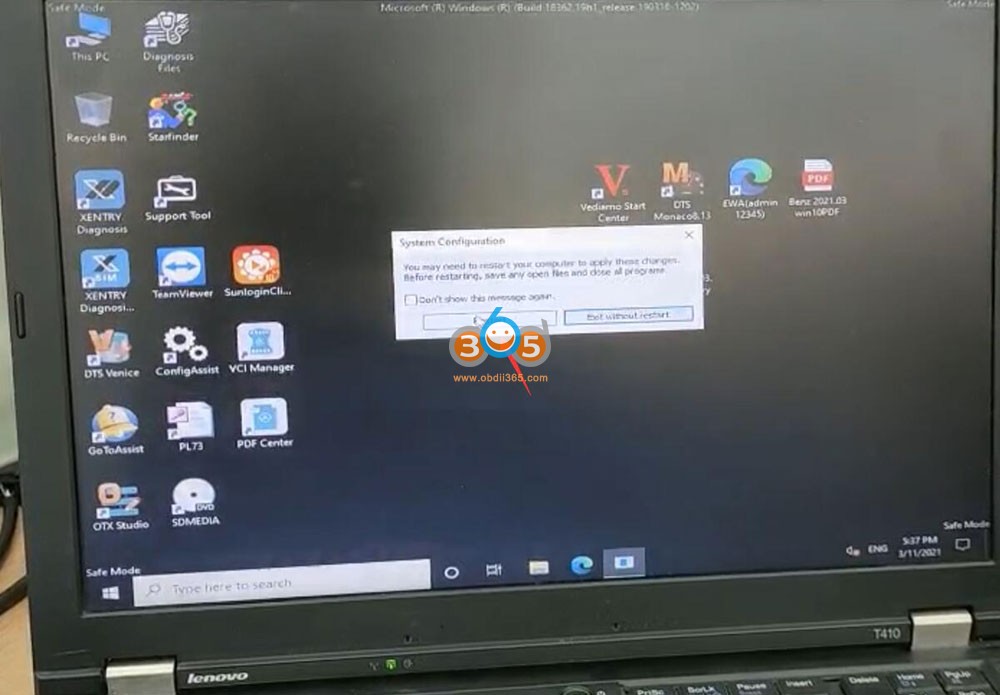
Press Win+R button to run command: msconfig, press OK

Solve Fail to Start MB Star Win10 HDD 10

Then choose Diagnostic Startup

Solve Fail to Start MB Star Win10 HDD 11

Restart computer

Solve Fail to Start MB Star Win10 HDD 12

Software HDD or SSD is ready to use after restart

Solve Fail to Start MB Star Win10 HDD 13

Solve Fail to Start MB Star Win10 HDD 14


7.27.2022

How to Activate 2022.06 MB SD C4 C5 Xentry XDOS?

 06/2022 MB Star diagnostic XDOS OpenShell software activation is slightly different from the previous version, the HDD/SSD contains activation keygens. Users have to activate Xentry, WIS, EPC, DTS and Vediamo manually.


Mercedes multiplexer affected: MB SD C4, MB SD C4 DoIPMB SD Connect C5Super MB Pro M6


Procedure:

  • Activate Vediamo by keygen
  • Activate DTS Monaco
  • Activate WIS EPC by keygen
  • Activate Xentry by keygen


1. Activate Vediamo 05.1.1

Run Vediamo software on deskotp
Open TOOLS folder on desktop, open keygen folder
Run vediamo 05.1.1 kg keygen
Copy and paste vediamo hardware ID here

Activate 2022.06 MB SD C4 C5 vediamo 1

Activate 2022.06 MB SD C4 C5 vediamo 2

Activate 2022.06 MB SD C4 C5 vediamo 3

press Generate to generate the registration key
Paste and Hardware ID to the registration name area
PASTE registration key to Key area and press Register

Vediamo is registered.

Activate 2022.06 MB SD C4 C5 vediamo 4

Activate 2022.06 MB SD C4 C5 vediamo 5

2. Activate DTS Monaco

Run DTS Monaco 8.16 software on desktop

Send hardware ID to sales@obdii365.com customer service

We will send you the activation key

Paste registration key to activate DTS

Activate 2022.06 MB SD C4 C5 dts monaco 1

Activate 2022.06 MB SD C4 C5 dts monaco 2

Activate 2022.06 MB SD C4 C5 dts monaco 3

3. Activate WIS EPC

Run EWA on desktop
Login with User Name and password
User name: admin
Password:123356

Then go to Go to Server-> Edit the access authorization

Activate 2022.06 MB SD C4 C5 wis epc 1

Activate 2022.06 MB SD C4 C5 wis epc 2

Activate 2022.06 MB SD C4 C5 wis epc 3

Open TOOLS folder, run CarProKey keygen

Activate 2022.06 MB SD C4 C5 wis epc 4

Select EPC WIS program, copy and paste Lan ID, input Users 252 and expiration date (i.e 7/25/2030)

Press Generate to generate StartKey

Activate 2022.06 MB SD C4 C5 wis epc 5

Activate 2022.06 MB SD C4 C5 wis epc 6

Paste the ECP and WIS startkey to the corresponding area and save

Activate 2022.06 MB SD C4 C5 wis epc 7

EPC and WIS have been activated and ready to use

Activate 2022.06 MB SD C4 C5 wis epc 8

Activate 2022.06 MB SD C4 C5 wis epc 9

4. Activate Xentry

Run ConfigAssit on desktop
Select SDConnect VCI

Activate 2022.06 MB SD C4 C5 xentry 1

Go to C/ProgramData/LicDir folder
Delete lic_key_2.dat and lic_key_2.x4711 two files

Activate 2022.06 MB SD C4 C5 xentry 2

In ConfigAssit, select Configure

Activate 2022.06 MB SD C4 C5 xentry 3

Press Lock icon, it says failed to connect to server because xentry is not activated. Paste the Hardware ID

Activate 2022.06 MB SD C4 C5 xentry 4

Run Xentry Advanced Keygen from C/Program Files (x86)/TOOLS/keygen folder

Activate 2022.06 MB SD C4 C5 xentry 5

Activate 2022.06 MB SD C4 C5 xentry 6

Tick No icon until brings the generator interface below

Paste hardware ID here, enter Lic numer as 252, change date end till July 2030, press Generate to generate the license key.

Paste the License key

Activate 2022.06 MB SD C4 C5 xentry 7

Back to ConfigAssist, go to Manual

Paste the Xentry activation StartKey to the corresponding area and save.

Xentry is activated.

Activate 2022.06 MB SD C4 C5 xentry 8

Activate 2022.06 MB SD C4 C5 xentry 9

Activate 2022.06 MB SD C4 C5 xentry 10

Change the extension of the copied file to “.x4711″
Right click lic_key_2.x4711 Properties and tick Read-only

Activate 2022.06 MB SD C4 C5 xentry 11

Go to Control Panel, check if the firewall is turned off

If want to connect MB SD C4/C5 via LAN network cable, change the IP address to

IP address: 172.29.127.11
Subnet mask: 255.255.255.0

Activate 2022.06 MB SD C4 C5 xentry 12

Check the detailed video guide here

*For the version that does not have keygens, activation is done by providing hardware ID to us.

http://blog.obdii365.com/2022/07/27/activate-2022-06-mb-star-xentry-wis-epc-dts/