5.10.2023

How to Repair MB SD C4 DoIP Connection?

 If anyone has problems with MB SD Connect C4/C4+ DoIP connection, check the voltage on the 8th leg of the OBD connector when the Doip connection is turned on, a voltage of 6.5V should appear

How to Check Mercedes MB STAR C4 devices using the DOIP protocol using a multimeter.:

Repair MB SD C4 DoIP Connection 1

Repair MB SD C4 DoIP Connection 2

Repair MB SD C4 DoIP Connection 3

Repair MB SD C4 DoIP Connection 4

VXDIAG Benz multiplexer works the same way.


For those who do not have voltage, we disassemble the C4 or C4 + device, we find the diode as in the photo (circled in red) and look at the value, if it is different, then change it to the one in photo 3, we also measure the voltage on the diode itself. All this applies only to devices where there is DOIP in the configuration.

Repair MB SD C4 DoIP Connection 5

old style C4 board

Repair MB SD C4 DoIP Connection 6

New SD C4+ board

Repair MB SD C4 DoIP Connection 7

Diode replacement.

solder the diode and everything after this before and after works great

Repair MB SD C4 DoIP Connection 8

Repair MB SD C4 DoIP Connection 9

The exchange of diagnostic information over Internet Protocol (DoIP) is performed using a standardized service interface as specified in the ISO14229-2 standard.

4.20.2023

Download and Install DTS Monaco 9.02

 Free download Mercedes Benz engineering software DTS Monaco 9.02 + Patch.


Shared by justdiag. You are at your risk.


Install setup download

Patch download

Install password to patch: Softing-DTS-Monaco-9-02-001.20200729.3

Projects LKW&PKW (3 parts)

Part 1

Part 2

Part 3

password: justdiag


ZenZefi Certificates Server (optional) 

Without Zenzefi Certifcates, No point in using DTS 9.


NOTE: Keygen is not included.

You can get activation from mhhauto or cartechnology.co.uk.

or online activate from us

https://www.obdii365.com/wholesale/dts-monaco-9-02-activation.html

check

How to Activate DTS Monaco 9.02?

How to Install DTS 9.02?

1. Install DTS9.Daimler.Setup.exe from DTS9 folder

install dts monaco 9.02 1

install dts monaco 9.02 2

2.Run DTS-Patch.exe using the DTS9 Patch password.txt

install dts monaco 9.02 3

install dts monaco 9.02 4

2.Run DTS 9.02 and close it. then you will get HWID.ext from C:/Program Files/Softing/DTS9/9.02

install dts monaco 9.02 5

install dts monaco 9.02 6

4.Copy the HWID from HWID.txt then paste it to keygen, click generate license key

install dts monaco 9.02 7

5. You will get the license file in DTS9Keygen folder, copy it and paste to C:/Program Files/Softing/DTS9/9.02

install dts monaco 9.02 8

install dts monaco 9.02 9

5. Software is activated. Run DTS 9.02 software.

install dts monaco 9.02 10

install dts monaco 9.02 11

 https://www.obdii365.com/wholesale/mb-star-sd-c4-dell-win10-500g-hdd.html

MB Star WIS ASRA Icon Gray Solution

Problem:

I have a problem with 03/2023 mb star xentry WIS software. ASRA icon is gray. Any solution?

MB Star WIS ASRA Icon Gray Solution 1

Solution:

Go to Settings, select the language as English or other languages. Don't choose language as US English. 

MB Star WIS ASRA Icon Gray Solution 2


3.13.2023

MB Star Mercedes SAM Coding Guide

 Mercedes Benz W220 has 3 SAMs, Rear, Front Left and Front Right, and on this case there is only a couple of Alarm Codings in the Front Left SAM, so the pictorial shows you how to reach the codings. Here we show you how to select a Coding to get it’s other options and then you all done fiddling which Icon or (F5 button) you hit to actually carry out the coding otherwise it will stay as it was before after you exit the Coding screen !!


Note that if you do screw it up, and weird stuff happens, you can go back in and alter Codings again, so panic ye not !! What you do here is not irreversible. What I advise is to screenshot and save the Codings that are in the Module before fiddling, so you can go back to base line if necessary 

Follow the pictures, note where to click by where the cursor arrow is, which takes you to the next screen, and all MB Star SD C4 diagnostic users should know by now that if you wanna go back a screen click F1 or the /\ Icon .

So here we are, inside the infamous W220.

MB Star Mercedes SAM Coding  1

Select your vehicle screens

MB Star Mercedes SAM Coding 2

MB Star Mercedes SAM Coding 3

MB Star Mercedes SAM Coding 4

MB Star Mercedes SAM Coding 5

MB Star Mercedes SAM Coding 6

MB Star Mercedes SAM Coding 7

MB Star Mercedes SAM Coding 8


That will get you to the next Control Units screen which should also be familiar.

MB Star Mercedes SAM Coding 9


So Highlight Control Units and click F3

MB Star Mercedes SAM Coding 10

Now you need a bit of knowledge or have to go looking in systems (Drive / Chassis / Body etc etc), I happen to know SAM’s are Body, highlight and hit F3 .

MB Star Mercedes SAM Coding 11

Lets look at Front Left on this vehicle, highlight Control Unit Adaptations and hit F3

MB Star Mercedes SAM Coding 12

Now you see Read Coding And Change If Necessary, yeah yeah, Highlight and F3

MB Star Mercedes SAM Coding 13

There is only 2 Alarm Codings to see in this W220, the SL R230 and others should / might have more model specifics, so now we gonna use the same procedures as above and show you a whole bunch you can meddle with in ICM (Instrument Cluster) so go back to Body Chassis etc and ICM is not in “Body”, (3 pics back !!  keep the heck up !! ) it is actually found in “Information and Communication” (of course it is) 

Now see I’ve magically jumped into the ICM by going back a few screens and re-selecting to get to ICM

MB Star Mercedes SAM Coding 14

Highlight “Control Unit adaptations” and “Variant Coding” and hit F3

MB Star Mercedes SAM Coding 15

Now we can really mess things up, seriously though this shows a load of version codings lets look at which is the drivers side, pretend this screen says left….


MB Star Mercedes SAM Coding 16

So highlight Left, click F3 it will take you to the options, so we wanna change it to Right, now, after highlighting Right click F5 in this screen and that’s that job done come out of ICM then go back in and re -read it just to make sure it is stuck !!

MB Star Mercedes SAM Coding 17

This next screen shows you another list of stuff in the W220 Cluster to play with
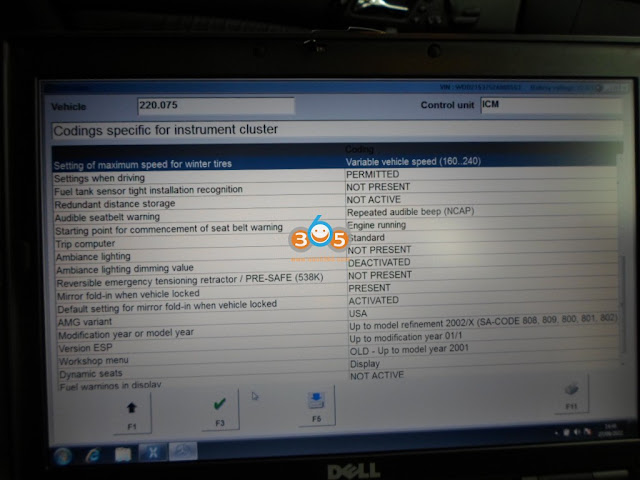
MB Star Mercedes SAM Coding 18

There we go, how hard was that.

Now, just take note every Car model is different, so for example there will be less or more codings depending exactly which car you are working on.

Earlier Platform Cars like R170 will use DAS for Motor Codings, (note there is a special procedure needed as the ME has to be unlocked), unlike a SAM, ICM etc which don’t need un-locked. There are other modules such as ICM on R170 that you have to access it’s Codings via the HHT Menus, that is kinda self explanatory.

Next upwards platform Cars like W220 are all DAS program Codings.

http://blog.obdii365.com/2023/03/13/mercedes-w220-sam-coding-with-mb-star-sd-c4/

Mercedes VGS2 Virgin Modified CBF Download

 The CBF file will help people who have no tools to virgin 7G-tronic VGS2 unit.  If you changed the TCU VGS2 control unit, you can use this vgs2 virgin solution using vediamo.


Years ago I found a bug in 722.9 software, which allows to virginise the VGS2 units without need to calculate “sonderhash” or anything else. It is a reference to diagnostic procedures that are not implemented in the CBF files, but exist in the TCU code. So it is possible to call a normally inactive functions which remove personalization, activation and set transport protection on. To make it easy to use I modified original CBF so that this function can be performed just with one mouseclick.  I use it till now mainly to exchange broken VGS2 with used but good ones.

This solution affects all 2nd generation units (VGS2) with part number A 0335457332. Unfortunately, this “feature” does not work on VGS3 units because their EEPROM memory is double sized and TCU code cannot properly execute internal procedures. So it will not work on 3rd generation units with part number A 0034460310. However, in many cases and cars produced even after year 2008, which was factory equipped with VGS3 you can still use VGS2 as replacement.

To connect with TCU you need to have also normal VGSNAG2.cbf file. So if you have already Vediamo (no matter which version and which MB Star MUX) you just need to replace your vgsnag2.cbf file with modified one and you will be able to bring your VGS2 units in virgin state. After that, to make them than fittable to any 722.9 gearbox, you should flash them with correct software, set right SCN coding and relearn range sensor. All this is possible using Vediamo offline.


Free download VGS2 NAG2 Modify CBF File


This will work on any vgs2 conductor plate. Erasing of personalisation and activation on 7G-Tronic TCU with part number A 033 545 73 32 by Vediamo only. No need to calculate hash or security access.

Using this VGSmod2.cbf file you must be also able to establish communication with TCU by pressing F3 button. It you have no connection – check cables, CAN resistor or interface (MUX).

After you are connected, press F6 button on your keyboard – it should read DTC faults. Than you can press the button safe data.
Do the same with with F7 button.


Credit to gearbox.expert from mhhauto.


Here’s the step by step guide to virgin VGS2 TCU with Vediamo

How to Virgin VGS2 TCU Mercedes 722.9 via Vediamo?

2.28.2023

MB SD C4 vs VXDIAG vs Openport for Xentry

 Which is better Mercedes Benz MB Star diagnostic device? VXDIAG, MB SD C4 or OpenPort2 VCI?

MB SD C4 vs VXDIAG vs Openport

Openport 2.0:

The disadvantage of the connector is it falls of with constant use. We recommend openport with a gold connector.

openport with gold connector

There is a tutorial on how to solder it so that it is more stable. It is quite suitable for diagnostic, but risky for update modules for firmware.

How to Modify Tactrix Openport 2.0 Clone


It has small volume RAM, when coding some serious new module there maybe 51 encoding are written incorrectly. Because there is not enough operational memory in the original device (only 512 megabytes.).  What also you can say about it old vers. Openport cannot read well until 2005. We don’t recommend on old car at all.

There is no sense to connect modules ME28 E20 just does not see as well as SBC. Cars since 2005 are read without problems, all modules of W164, W221, does everything reads.
More about internet wanted to say guys are not afraid here is no internet all this is speculation.


Pros:

  • Good reasonably priced option if you don’t need to do any module updates.
  • Openport 2.0 is not limited on Can- Cars from 2006 and above!
  • useful for ECUs with CAN capability.
  • For normal troubleshooting and diagnosis, though, it rocks.

Cons:

  • you won’t be able to access K-Line ECU’s that are widely used in old K-line models
  • if you want to work with vediamo you can’t use vediamo 5 (4 can’t use smrd files) because vediamo 5 doesn’t support Passthru so your “stuck” with DTS Monaco
  • You’d better replace R1 by 47k for better operation and to avoid overheating.
  • You are risking of getting failed and then potentially bricking your ecu if need to do ECU SW updates.


Read more

Tactrix Openport 2.0 with Xentry Passthru Pros and Cons


VXDIAG VCX SE

Next we will take about vxdiag- a beautiful device well. We consider it the most versatile device for your money.
The truth has risen in price due to the increase cost.

When use this device, put in obd connector, connect the machine, computer and USB, and only then turn on the ignition in reverse order exactly the same turn off the ignition.
Pull out from the computer, remove the usb connector.  VXDIAG reads W223 well, read W213 pretty well.

The problematic pattern new xentry need to be latest drivers.


Pros:

  • compatible with both Passthru (as j2534 passthru device) and XDOS openshell (as C6 VCI)
  • The license, firmware can be updated in driver app, it is a lifetime license and its working with the new software
  • VCX SE is more stable than Tactrix openport clone but it is acting the same way J2534 protocol.
  • The main reason for buying vxdiag is that it has DoIP for new cars.
  • vcx se connects via WiFi and it’s very convenient. wlan connection is stable at a distance of up to 2 m.
  • there is already a Type C connector and it is held very tightly
  • firmware updatable
  • you can also use BMW and there are a lot of all sorts of programs that it supports
  • as much as modules can be scanned
  • Work best offline.

Cons: 

  • It does not support older models with K-line protocol, it is for 2005 up Mercedes.
  • Vediamo 5 needs special setting
  • Have to update vci firmware and C6 driver when new versions come out
  • not very good on Mercedes trucks

Read more:

How to Set up VXDIAG VCX SE Benz as Xentry Passthru Device?


MB SD Connect C4/C5 

Next device is C4. C4 also works well for older cars ME28 ME20. It is irreplaceable thing because it works great on cars before 2005.

But sometimes the new models does nto read very well, often does not seel all modules especially w223.
but this is enough for full car service and diagnostic function. It works great with DTS Monaco program which is wonderful works with sbf files with MRI.


Pros

  • works vehicle both new and old
  • The newer c4 muxes all typically have wifi.
  • The mux itself has a DHCP server inside and leases an IP address to the laptop.
  • You don’t have to install batteries for firmware update.
  • New cooler for long operation


Cons:

  • multiplexer and connector quality varies, some good, some poor

2.27.2023

MB Star HHT Cannot Read EZL and DM Solution

 Here we share user working experience on older Mercedes with HHT-WIN software.


Here goes the story.

“I got the C3 and C4 from Aliexpress, both HHT-WIN has problems accessing EZL and DM modules.  I received my third multiplexer-MB SD C4 DoIP from obdii365.


3rd C4 & my 2015 Star diagnostic Software – Engine OFF
LH and GM communications works
EZL and DM communications does not work

3rd C4 & borrowed known-good 2018 Star diagnostic Software from nearby MB independent repair shop – Engine OFF
LH and GM communications works
EZL and DM communications does not work

3rd C4 & my 2015 Star diagnostic Software – Engine OFF
LH and GM communications works
EZL and DM communications does not work


Then I figure out the problem. This C4 multiplexer works.

I was super frustrated so I borrowed a known-good cable from JSP Porsche MB Independent Service.
When I used the good borrowed cable with the C4, all the car scanning functions work properly — even while the engine is running!
When I used the Apliexpress 38-pin cable, the EZ and DM scanning functions do not work.
Well I am relieved — now I just need to get a good functioning cable!!!

So in sum:

My first MUX – the C3, worked to scan the GM and the LH, but not the EZL and not the DM. I suspected it was the cable, but I just returned the whole thing.
My second MUX – the AliExpress C4, worked to scan GM, LH, EZL, and DM ….. but only when the engine was off / ignition was on. I suspect the cable was fine, but some weird voltage thing was going on inside the MUX that made it intolerant of the higher voltages with a running alternator that precluded it from scanning EZL/DM with the engine running.
My third MUX – the obdii365 C4, actually looks to be a quality unit (it is a bit more polished than the Ali C4) but the cable was defective…… which caused it to not be able to scan the EZL or the DM — ever. A full 22 of the 38 pins were not hooked up!!!!!

I was suggested to get older software than they sell (they sell as far back as 2018 software) because the earlier software works better with HHT-Win (I think.)


EZL Live Data While Engine Running Money Shot Below:

mb sd c4 hht-win ezl live data 1

mb sd c4 hht-win ezl live data 2

mb sd c4 hht-win ezl live data 3

mb sd c4 hht-win ezl live data 4

mb sd c4 hht-win ezl live data 5


38-pin diagnostic connector pinout diagram that specifically talks about 124/129/140/170/202/208/210 models.


benz 38 pin cable pinout

Aliexpress was not able to send me a fully pinned out cable. Their “manufacturer” doesn’t make a fully-pinned cable.

I took $40 and spent it on obdii365.com who claimed, when I contacted them, that their cable is fully pinned.

It is not that easy to find a 38-pin cable where all the pins are connected to the C4 connector.

I asked a bunch of ebay vendors about pinouts for their 38-pin cables. Many of them did not get back to me.

However, the vendor for these advertisements on ebay confirmed that NOT all 38 pins are hooked up, although it does look like pins 7 and 17 (EZL) are definitely hooked up.
It also looks like pins 18/19 are tied together, and I am not sure if the DM would work, let alone other special 129, 210, and 140 special functions past pin 20 which are NOT hooked up.

benz 38-pin cable pinout 2

I tried the obdii365 38 pin cable with my C4. Guess what?

IT WORKED PERFECTLY. EZL and DM readings worked fine. I received the cable today and it works! DM, EZL, LH, GM … all accessible!

mb sd c4 hht and full pin 38 cable 1

mb sd c4 hht and full pin 38 cable 2

mb sd c4 hht and full pin 38 cable 3

mb sd c4 hht and full pin 38 cable 4

mb sd c4 hht and full pin 38 cable 5

mb sd c4 hht and full pin 38 cable 6

Then we switched back to my cable. Nope-a-roo! No EZL and no DM readings!

Also guess what? It appears his cable and my cable are visually different!!!!

mb sd c4 hht and full pin 38 cable 7

Up: aliexpress 38-pin cable with only 16 pins attached

Down: fully pinned cable from obdii365


Tip: Do not buy the 38 pin cable from sellers on AliExpress either.
Their cable also does not have the required number of pins hooked up.

mb sd c4 hht and full pin 38 cable 8


A couple of things about the C4 MUXES along the way if anyone choses to buy one. There seems to be a couple flavors of these that all look very similar.

  • Try to get a newest designed c4. My first AE c4 mux was cheaper and had no wifi, and I think it was an older design. When I got it and connected it to the car, it would constantly flash messages about needing to insert rechargeable batteries to address some charging issue, and it didn’t sound so good even though conventional wisdom on benzworld and mhhauto was to just ignore the message. Also, my first AE mux had rust stains on the heat sink under the rubber protectors, misspelled labels, screws on the end panel (where the connectors are) that didn’t screw in, and uneven places on the heatsink that were shiny/dull/shiny/dull. I did not take out the circuit board to look at it, but all these things made me nervous so I sent it back. The newer c4 I got had none of these issues.


  • The newer c4 muxes all typically have wifi. At first I thought wifi is just another thing to go wrong, but I quickly realized that it is quite useful. The mux uses wifi to connect to the SDS laptop on its own SSID. You can decide to not use wifi and then you connect the mux to your laptop with a long ass ethernet cable with funky rj45 connector, but what I realized is that it is really easy for the green cable get tangled up in the radiator fan!


  • There are two wifi “models” of c4 muxes…regular wifi and I THINK (not certain)DOiP. The regular one is kind of a pain to set up. You have to first connect the mux to your laptop with the green cable, then set a static IP on the laptop for the wifi adapter, then go into a funky software program that sets up the mux, then manually set two SSIDS for the mux to broadcast … “Road24” and ”Workshop” ….. and then set static IPs for the mux to use when using those two SSIDs, the unplug then green cable and the hope the laptop connects to the mux and never touch that shit again. The newer ones, MB SD C4 PLUS DOIP, are much easier. Just connect the laptop to the wifi SSID the mux is broadcasting out of the box “XC4PLUS” and you are done. The mux itself has a DHCP server inside and leases an IP address to the laptop.


  • If you are using this mainly for your w124 then 2015 Star diagnostic software and WinXP is good. It works well as long as it has HHT-WIN. You can just run DAS which brings up HHT-WIN or execute HHT-WIN directly. In my troubleshooting, I borrowed an SDS laptop from JSP MB that had 2018 software on it. It had HHT-WIN in it too with Win 7 but was significantly clunkier. I had to run XENTRY, which then brought up DAS, which then decided to (emulate?) HHT-WIN in a goofy vertically stretched window. It worked, but it felt like there was more to go wrong.
http://blog.obdii365.com/2023/02/27/choose-a-fully-pinned-38-pin-cable-for-mb-sd-c4/