MB Star diagnosis DAS software can code out ABC, here is the example on code out Mercedes SL65.
NOTE : the instruction here only for R230s (not any W215, W216, W220, W221)
To do this, you need a MB Star diagnostic SD Connect C4 with Developer mode. Hook up SD Connect diagnostic system to your car and when it reads your car, select
Control Units, pick Information and Communication and you will see ICM :
After ICM, you will see Control Unit Adaptions :
From there, choose the year of your model :
From there, select Special Equipment
Select ABC :
• Then go to the drop down tab and change it from PRESENT to NOT PRESENT, and click F3.
• After that, turn off the car, with the doors closed.
• Wait 1-2 mins and start the car back up (no more ABC codes and no white or red lights).
http://blog.mbstartool.com/2017/05/30/mb-star-diagnosis-coding-out-abc-on-mercedes-r230/
Mercedes Benz MB SD Connect 4 and DAS/XENTRY/EPC/WIS diagnostic software technical support.
5.30.2017
3.31.2017
Mercedes E350 2006 car cranks fault p0335 solved by MB Star
As the title suggest, Mercedes 2006 e350 car cranks but won’t start with p0335 fault code, and MB STAR SD CONNECT C4 is best to recommend.
Car model and year: Mercedes e350 2006
Fault code and description: would crank but would not start… It has p0335 code for Crankshaft Position Sensor “A” Circuit Malfunction and it also has a p0306 misfire on cylinder 6, and it shakes very badly.
What I did and what I doubt?
I recently replaced the ignition coil on cylinder 6 because it was faulty, not sure if they are related. Would changing the CPS solve the issue? And do the two codes p0335 and p0305 relate two each other at all. Also, could it be the fuel pump? the previous owner had no start problems couple years back and it turned out to be the fuel pump which he replaced.
Solution:
- The cps needs to be replaced, that controls the firing.
- It takes a lot of special tools to work on Mercedes cars. I have been collecting those tools for years. This was a case that a full Mercedes MB STAR diagnostic may have shown the exact problem and saved time and money, and set of torx drivers. Harbor Freight tools have a good selection. As to the rpm question perhaps someone else will know the answer. I have never checked the rpms when the cps was bad.
MB star SD connect C4 is the newest and best to recommend.
Invest a SD connect C4, you can not only use it to read out and show exact problem p0335 code, but also do more like: switching heater booster to the water heater, enabling/disabling some cluster menus, enabling corner lights and integrating an aftermarket alarm and remote was like a walk in the park.
Reset the adaptations on transmission, drive-in adaptations on the transmission, and relearning of the throttle plate and sunroof.
I had changed my battery and afterwards the sunroof would not go back smoothly. I went into the relearn function and voila it worked.
Can lower the suspension with Das-Xentry,
SDConnect C4 can be used to modify and adjust settings on control units.
Here SDConnect C4 (sales for only US$529 at known)
One thing for sure, MB SD Connect C4 is optional to choose External hard drive and Internal Hard drive.
External hard drive yes and no:
1) If laptop broke, you could just plug it into another machine.
2) It’s a lot slower than running it from disk, because of VMWare overhead. If you use it 2 or 3 times a year, a VM solution is perfectly fine.
3) Hangs off the machine and can be damaged as you move the laptop around. If you pick up the laptop, the USB drive unplugs, then it will fall to the ground and you’re cooked.
Internal Hard drive advantages:
1) Much faster, if you use it quite a bit then go External hard drive.
2) Internal is so much nicer because now I just have the multiplexer and laptop to carry to the car. Nothing to unplug or fall off.
loading..
3.19.2017
FAQ 2016 MB Star SD Connect C4 Xentry DAS
Here are the most frequently-asked questions from MB Star diagnosis SD connect C4 diagnostic scanner users and professional answers from engineers working for mbstartool.com. Hopefully, it helps those in trouble.
Q: How to change the Xentry language?
A: Go to Setup, select Setting language, then choose a language and click on Accept.
Q: How to setup the DAS language?
A: Go to DAS Properties. In the Target, change the last two letters (which is the first two letters of the language). Then click on OK.
Q: Xenry language error: A fault has occurred.
A: Change the PC date and time to be the same as the Xentry version.E.g. Your Xentry is version 2015.09, you need set up 2015.09.05 on your PC.
Q: Fault (30.3) pops up after DAS activation. No valid DAS license; DAS will now be closed.
A: Go to local disk C:/programme files/Mercedes-Benz/StartKeyCenter2; find our StartKeyCenter.exe.
If DAS doesn’t expire, just change the bin file in C:/programme files/Mercedes-Benz/DAS
If DAS expires, you need Lan-id to activate DAS
Q: Xentry cannot run, the icon displays then disappears.
A: Change the PC date and time to be the same as the Xentry version;
If it does not work, replace the bin file in C:/programme files/Mercedes-Benz/DAS (the bin file differs from Xentry versions)
If all above fails, send the Mercedes software hard disk to the vendor to re-copy files.
Q: MB SD connect c4 firmware files are lost and WIFI cannot be set up.A: It means your sd connect firmware files are deleted and you need update sd c4 firmware.
Files need to update (ORDER!!!!!!):
02_CSD_2_10.zip
01_Boolimage_2_3.zip
03_PmPic29_Cpld23.zip
Sd connect c4 firmware update manual:
http://blog.mbstartool.com/2015/08/25/instruction-for-update-and-install-v2-30-mb-sd-connect-c4-mux/
Note: please prepare new batteries and an OBD cable for use; if it fails to connect to the vehicle, replace it with the OBD 12V power; otherwise, it would pop up error 662 (update fails.)
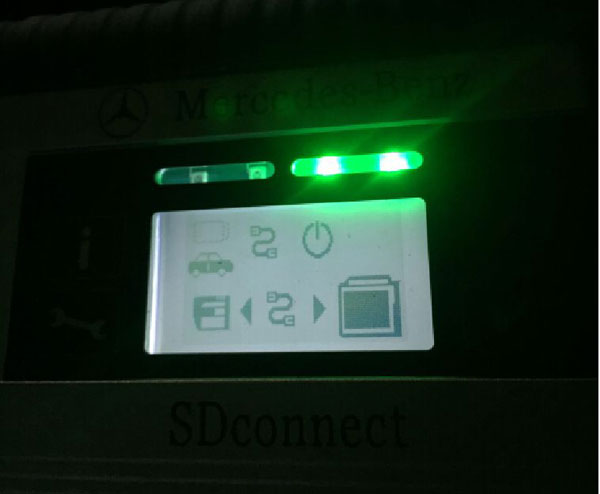
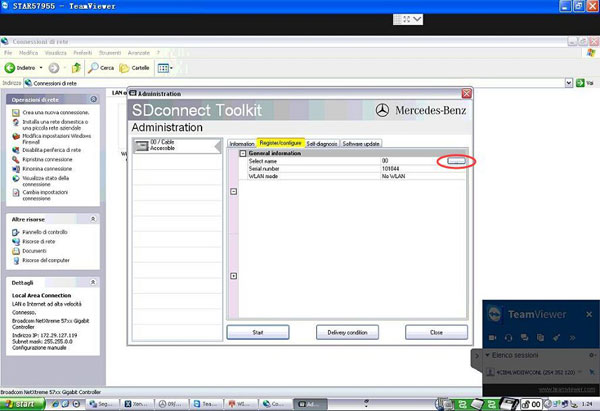
Q: SDconnect Tool kit appears Error 749 in Administration.Due to network problems, no connection to the SDconnect can be establish (749)No SDconnect is selected or the desired SDconnect cannot be selected
A: It results from incorrect IP setup. Please go to the network connect to WLAN set up IP:172.29.127.119
Q: Xentry error 2221-45: No access authorization code![2221-45] No access authorization for XENTRY diagnostics was found on the server. You must contact the user help desk.
A: Go to C:/programme files/Mercedes-Benz/Xentry/fusoko/eclipse/plugins; delete the file “com.damler.xentry.diagservice_1.6.0.201607181047”
Q: Xentry cannot open for use even reopen Xentry or restart the PC after activation.No access authorization code! You must contact the user help desk.
A: Go to C:/programme data/LicDir; delete lic-key2.dat
Open StartKeyCenter on Desktip; activate Xentry
Get a new lic-key2.dat after Xentry activation; copy and paste lic-key2.dat; then rename it as “lic-key2.x4711” (setup the file properties to Read Only)
Q: EWA-NET file cannot start. HTTP Status 500-Servlet execution threw an exception.
A: Go to the Start menu, then EWA-NET Admin ToolIn EWA Admin Tool, Server, EPC, WIS all should start (if they have started yet, pls. stop and restart)Server, EPC, WIS restart, reboot the PC, then open EWA-NET to login
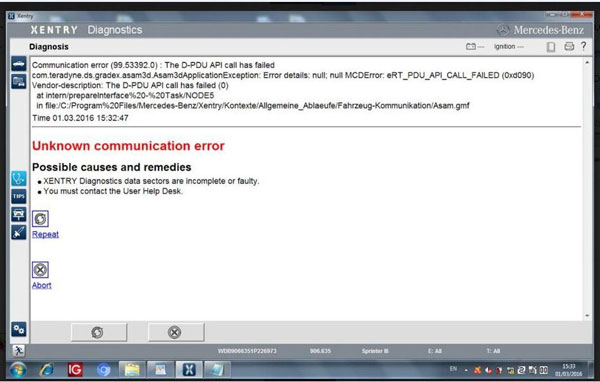
Q: Xenry Error (1.2)-2.503.13003:Initialization of diagnosis multiplexer failed
Possible causes:
The link between the diagnosis multiplexer an the diagnostic socket is interrupted
The link between the diagnosis multiplexer an the diagnostic unit is interrupted.
The voltage supply at the diagnostic socket (circuit30 and (or) circuit31)is fault.
Note:When using SD connect c4 multiplexer, check the connection status using the Toolkit.
A: check the connection of the cable and the car;
Then check the wired&wireless IP setup
Then check the Mercedes software; it’s MB SD C4 software, not Star C3
If all ok, it may result from the SD connect c4 mux or the cable
BIG THANKS to engineers at mbstartool.com.
loading..
1.13.2017
MB Star DAS current key has been locked error solution
Problem:
2015.5V MB Star diagnosis SD Connect C4 diagnostic scanner display two errors:
1.The current key has been locked to a different machine. Please, contact support@yoursite.com fr a new key.
2.This application has been registered to 5
Error cause:
You have activated DAS with wrong ID.
Solution:
Provide your wrong ID to mbstartool.com engineer. We will re-activate DAS software for you.
loading..
1.01.2017
2015.05 SD Connect C4 “DAS license expires in 1 day” Solution
Problem:
I am using Mercedes-Benz MB Star diagnosis SD Connect C4 mux with 2015.5V DAS hard drive. It worked great, but today it suddenly give me error
“ihre DAS-Lizenz lauft in 1 Tagen ab” (Their DAS license expires in 1 day.).
Solution:
If you bought your mb star hard drive/solid drive from mbstartool.com, please open STAR Utilities program on desktop, copy and paste DAS ID to our technician. We’ll activate the DAS Xentry software for you.
http://blog.mbstartool.com/2017/01/02/2015-05-das-license-expires-in-1-day-error-solution/
loading..
12.27.2016
Latest 2016.12V MB Star Diagnosis DAS Xentry for Win7 Win8
2016 latest version 2016.12V Mercedes-Benz MB Star diagnosis SD Connect C4 hard drive/solid drive for windows 7 and windows 8 are available in mbstartool.com.
Software version: 2016.12V
Software including:
1.D-A-S / Xentry 2016.12 : the automatically Diagnosis Assistance System ,Concise interface and straightforward operation with IB M high-quality computer can realize the quick and accurate code reading and the whole car system testing
2.W-I-S net 2016.11: Workshop Information System Supply the whole view of the wiring diagram in a car,component location diagram and maintenance method. What you do is to enter the chassis number, and then you will get the manufacture data, engine configuration and the car model -all in detail.
3.EPC.net 2016.11: Electronic Parts Catalog
4.ST Finder 2008/2016:Part location finder (Star Finder 2 version optional)
5. STARUTILITIES : the movement management system and self-test
6. SDMEDIA 2014
7.PL70
Language:
English, Croatian, Czech, Danish, Dutch, Finish, French, German, Greek, Hungarian, Italian, Japanese, Korean, Polish, Portuguese, Romanian, Russian, Spanish, Swedish & Turkish, Chinese
NOTE: V2016.12 WIN8/WIN7 HDD does not support HHT-WIN software! Software newer version than V2015.12 do not support HHT-WIN!
Xentry doesn’t support Bus at present, if you want to diagnose and program Bus, please choose DAS.
Once you take out software from laptop, it needs re-activation even if you install it onto the same laptop.
One time free software activation, after the first time activation, 25USD for software activation.
V2016.12 MB SD C4 Software Functions:
1.1989~up to now Car, Bus, Truck, Sprint, Smart ;
2.All electric system Diagnostic;(Do not include flash code)
3.reading trouble code
4.erasing trouble code
5.live-data
6.adaptation
7.component testing
8.maintenance
9.information consultation
10.component location diagram
11.wiring diagram
Testable system:
ENGINE
AUTO-SPEED
AIRCONDITIONAL SYSTEM
SRS
ABS
ASR
MPL
GM
Bz ORIGINAL ANTI-THEFT
DASX SYSTEM
KEYZESS GO SYSTEM
OBD-II SYSTEM
2016.12V MB Star diagnostic software display:
loading..
12.12.2016
MB Star failed to work on Mercedes W205 Solution
User puzzles:
I have installed Xentry 9.2014 in MB Star C3 multiplexer. It works well so far. Now, I need to make diagnosis on mercedes w205 year 12/2014 but It can not communicate with the car. C3 don’t work in all recent cars in xentry but in DAS is ok.
Experienced users’ suggestion:
C3 has many limitation regarding latest vehicles in Xentry.
It can’t diagnose it e.g w205, w212, w222, w906, smart 453 etc.
its glory is already passed unless you deal only with vehicles in DAS.
you have to change to MB SD Connect C4.
C4’s support also officially has been stop since 12-2015.
you have to change to MB SD Connect C4.
C4’s support also officially has been stop since 12-2015.
It is no different even you change folder.
it is different protocol with recent vehicles.
Both good at all new Mercedes Benz models,W222, W221, W212, W203, 211,W 204,W207, W212, GL166, B 246, CLS 218, SLK172 and Smart405, 451, 452, 454
Besides the MB Star diagnosis software c3 and c4 own, sdconnect c4/c5 added three more software: SD Media, Xentry and Smart TAN Code.
SD Media: Video and PDF lessons;
Xentry: New software released by Benz Company after 04/2009 by diagnosis new cars. Xentry software for diagnosing W 204,W207 and W212 which C3 and C4 does not support;
Smart TAN Code: Opened special function in DAS program with Smart cars 405/ 451/452/ 454.Besides, it also opened more special functions, such as engineer mode, remove limitations,etc, which Star C3 and Star C4 do not have.
SD Media: Video and PDF lessons;
Xentry: New software released by Benz Company after 04/2009 by diagnosis new cars. Xentry software for diagnosing W 204,W207 and W212 which C3 and C4 does not support;
Smart TAN Code: Opened special function in DAS program with Smart cars 405/ 451/452/ 454.Besides, it also opened more special functions, such as engineer mode, remove limitations,etc, which Star C3 and Star C4 do not have.
I have successfully communicated wit my w205 AMG using a MB SD C4 connect all controllers accessed.
loading..
Subscribe to:
Posts (Atom)