8.19.2019

How to configure OEM Benz C6 Xentry VCI interface?

How to configure OEM Benz C6 Xentry VCI Mercedes Benz diagnostic interface?
benz-c6-vci

Procedure:
configure-benz-c6-vci-1

Double click "ConfigAssist" on the desktop, select XENTRY Diagnosis VCI
configure-benz-c6-vci-2

Click on Configure
configure-benz-c6-vci-3

Press Continue
configure-benz-c6-vci-4

Press Continue
configure-benz-c6-vci-5

Select Manual and enter StartKey
configure-benz-c6-vci-6

Save StartKey
configure-benz-c6-vci-7

StartKey installed successfully. Press OK to continue
configure-benz-c6-vci-8

Register success. Press Continue.
configure-benz-c6-vci-9

Click on "Couple VCI" to connect VCI
configure-benz-c6-vci-10

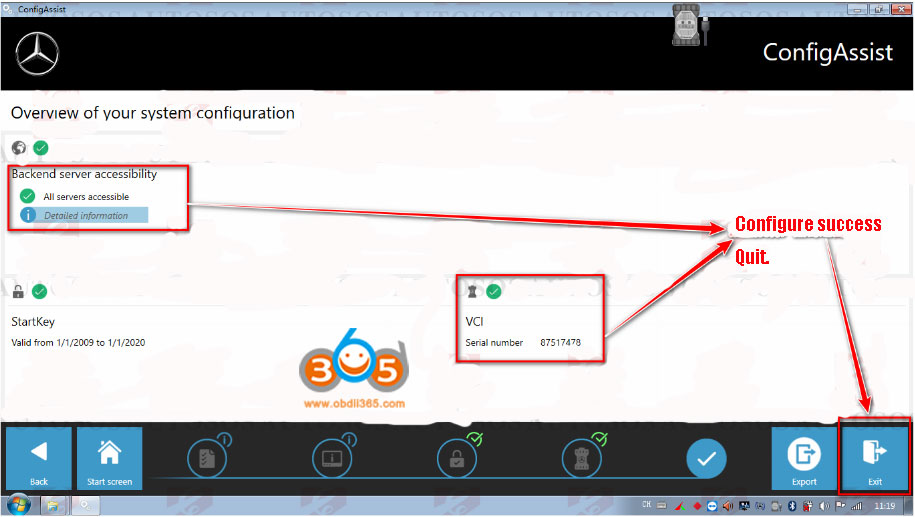
Configuration success. Quit.

http://www.obdii365.com/service/configure-open-benz-c6-xentry-vci.html

8.15.2019

How to set up MB SD Connect C4 PLUS DoIP WiFi Connection?

New MB Star SD Connect C4 PLUS DoIP diagnostic multiplexer enables WiFi/WLAN and USB connections.  Some of our Japanese customer reported that the doip c4 communicates fast and stable through WiFi. Check the step-by-step wifi setting guide below:

How to Configure mb sd c4 doip WiFi wireless connection?
set-up-mb-sd-c4-doip-wifi-1

set-up-mb-sd-c4-doip-wifi-2
Open Administration->SDConnect Toolkit
Select Register/configure tab
set-up-mb-sd-c4-doip-wifi-3

Select the name for SDconnect as 21
Enable both WLAN parameters, workshop and WLAN parameters, road option
Set up IP address, encryption type and key as following:
set-up-mb-sd-c4-doip-wifi-4

set-up-mb-sd-c4-doip-wifi-5
WLAN parameters, workshop
IP address: 192.168.191.31
Network screen: 255.255.255.0
Gateway:
SSID (network name): workshop
Encryption: WPA2/ASCII
Key: 123456789

WLAN parameters, road
IP address: 192.168.2.223
Network screen: 255.255.255.0
SSID (network name): Road24h
Encryption: WEP/Hex
Key: aaaaaaaaaaaaaaaaaaaaaaaaaa (26*a)
Press Start button
set-up-mb-sd-c4-doip-wifi-6
You’ll see WLAN and device status turn to yellow on toolbar
set-up-mb-sd-c4-doip-wifi-7
You are allow to print out the SDConnect Toolkit configuration settings as well
Close the MB SD C4 DoIP SDConnect Toolkit
set-up-mb-sd-c4-doip-wifi-8
Open and install Mars free WiFi Hotspot software on desktop
set-up-mb-sd-c4-doip-wifi-9

set-up-mb-sd-c4-doip-wifi-10

set the WiFi name as: workshop and password, then Save
Restart the computer !!!!
WiFi setting is done.
set-up-mb-sd-c4-doip-wifi-11
Now open the Xentry software on the desktop to start wireless diagnosis
i.e Runs a self-test on a Mercedes Benz C-class W204
set-up-mb-sd-c4-doip-wifi-12

set-up-mb-sd-c4-doip-wifi-13

set-up-mb-sd-c4-doip-wifi-14

set-up-mb-sd-c4-doip-wifi-15

http://www.obdii365.com/service/configure-mb-sd-c4-doip-wifi.html

8.14.2019

OEM Xentry VCI C6 (genuine vci look) How it works?

Let’s start with some questions on the Xentry VCI C6 OEM clone (looks like the genuine XENTRY Diagnosis Kit 3.)

Is it the clone of genuine Bosch xentry VCI?
Does it require install VXDIAG drivers?
Can it be used wirelessly?
Do you use ordinary Xentry openshell or Xentry openshell pass-through?

Answer:1. They have not cloned the new Xentry VCI
2. You can use ordinary XDOS without VXdiag Driver. Only config ecom and ready.
3. With keygen. No wireless or wifi, usb and lan only.
The one looks like original, but inside is different. It works like Ecom.
Here some Pictures of Xentry VCI C6 Clone.
The inside boards:
xentry-vci-c6-pcb-1

xentry-vci-c6-pcb-2

xentry-vci-c6-pcb-3
Software contains xentry (not DAS), vediamo, dts, epc/wis.
Test on A class W177 and a Brabus, fast USB connection and able to access all possible modules.
xentry-vci-c6-pcb-4

xentry-vci-c6-pcb-6

xentry-vci-c6-pcb-6

xentry-vci-c6-pcb-7
Downside:
The Benz C6 VCI should work with only the software they produce which can be expensive when updating.

Suggestion:
In conclusion we think the SD Connect C4 represents better value for money for the novice user who should wait until they can use Xentry software with confidence before moving to more advanced Vehicle Communication Interface, The C6 VCI seen in the photo is what a good high quality clone should look like and not the VCM2 encased version which is of lower quality
We only stock the highest quality VCI call us for free consultation.

8.07.2019

Original MB SD connect C4 alternative?

MB Star diagnostic SD Connect C4 (Item No. SP100-D) is a decent Mercedes diagnostic and programming tool. But now, it’s gonna stop production.
Today, we’ll talk about possible alternatives in the market:

  • Benz VCI C6
  • Benz C6 OEM
  • Xentry Connect DoIP C5 (not SD C5 clone)
  • Benz eCOM
  • Alllscanner VXDIAG VCX Plus for Benz
  • SD connect C4 PLUS DoIP
different-benz-scanners
Here’s well discuss all the Mercedes diagnosis tools

  1. Benz VCI C6: with dongle, same look as the genuine C6
  2. Benz C6 OEM
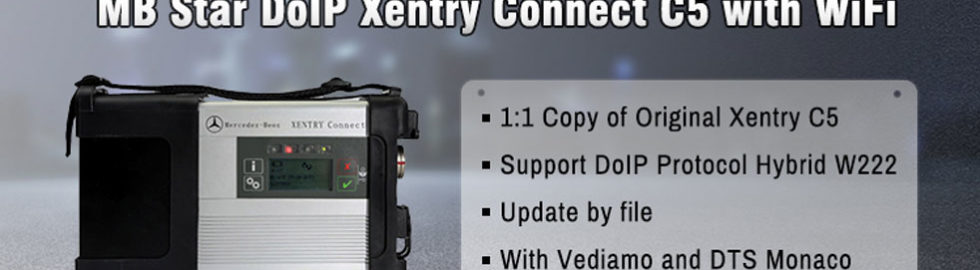
  3. Xentry Connect DoIP C5: not the C5 clone of C4. Software free update by file. DoIP enabled.
  4. Benz eCOM: good at diagnosis and programming
  5. Alllscanner VXDIAG Benz: features DoIP compatibility
  6. SD connect C4 PLUS: works with original Xentry XDOS, DoIP enabled

CAN & CANNOT:

CAN do:
All supports WiFi connection.
All MB tools here can work for Mercedes diagnosis, coding and programming.
All are confirmed to work with Xentry, EPC, WIS, SD media, Star Finder, PL73
All can work on new Mercedes

CANNOT do:
Benz VCI C6, Benz C6 OEM, Benz eCOM cannot work with Vediamo and DTS
Benz VCI C6, Benz C6 OEM, Benz ECOM cannot work on old Mercedes.

Detail table comparison
NameBenz VCI C6Benz C6 OEMxentry connect c5 doipBenz ECOMAlllscanner VXDIAG  Benz C6SD connect C4 Plus DoIP

 SP332-BSP332SP311SP335VX11-BSP100-E
Price569 usd
with sw in 500G HDD
549 usd
without sw
1049 usd1179 usd
with sw in 256G SSD
369 usd
without sw
429 usd
without sw
Featurewith dongle, same look as the genuine C6DoIP enabled


good at diagnosis an programming

DoIP enabledworks with original Xentry XDOS, DoIP enabled
Software compatibilityFactory HDD/SSD onlyFactory HDD/SSD onlyFactory HDD/SSD onlyFactory HDD/SSD onlyFactory HDD/SSD onlyFactory HDD/SSD,
original software
UpdateBy HDD/SSDBy HDD/SSDFree update by fileBy HDD/SSDBy HDD/SSDBy HDD/SSD
DiagnosisYesYesYesYesYesYes
SCN codingYesYesYesYesYesYes
ProgrammingYesYesYesYesYesYes
Xentry/DASYesYesYesYesYesYes
EPCYesYesYesYesYesYes
WISYesYesYesYesYesYes
SDmediaYesYesYesYesYesYes
Star FinderYesYesYesYesYesYes
PL73YesYesYesYesYesYes
DTS MonacoNONONONOYesYes
VediamoNONOYesNOYesYes
New MercedesYesYesYes
DoIP enabled!
Yes
DoIP enabled!
Yes
DoIP enabled!
Yes
DoIP enabled!
Old MercedesNONONONOYesYes

The best alternative is…
SDconnect C4 PLUS, released in the year 2019
mb-sd-c4-doip-plus
The old SDconnect C4 and new C4 PLUS share the same look.
But the C4 PLUS with PCB updated, can communicate with vehicles with DOIP like the newest hybrid W222, W205.
Look here:
mb-sd-c4-doip-pcb
This is the new components added on C4 PLUS on PCB.

2019 SD connect C4+ PCB:
mb-sd-c4-sp100-e-pcb-1

mb-sd-c4-sp100-e-pcb-2

mb-sd-c4-sp100-e-pcb-3

mb-sd-c4-sp100-e-pcb-4
source:
2018 SD connect C4 PCB:
mb-sd-c4-sp100-d-pcb-1

mb-sd-c4-sp100-d-pcb-2

mb-sd-c4-sp100-d-pcb-3

mb-sd-c4-sp100-d-pcb-4

mb-sd-c4-sp100-d-pcb-5
source:


2019 doip mb sd C4 PLUS features:

It’s 1:1 clone of the original
Able to work for DoIP
Compatible with original Benz dealer software
It’s the only C4 that supports ethernet communication (DoIP)
Have tested no issues on new mercedes with doip
You don’t have to install batteries for firmware update
No need worry about firmware damage in the update process
The wireless connection is stable
MB SD Connect C4 is connected automatically to WLAN for diagnostic tests
Also, remote help is available
The C4 machine has good quality
It’s waterproof, shockproof and tamper proof
7.25.2019

How to set up new MB SD Connect C4 DoIP?

To use new MB Star SD Connect C4 DoIP diagnostic scanner, you need to configure it first.  Follow steps below to configure SD Connect C4 DoIP multiplexer:

configure-mb-sd-c4-doip-1
1. Go to local network connection
configure-mb-sd-c4-doip-2
2. Press Properties
configure-mb-sd-c4-doip-3
3. Choose Internet Protocol Version 4 (TCP/IPv4), press OK to continue
configure-mb-sd-c4-doip-4
4. Enter IP address
IP address: 172.29.127.24
Subnet mask: 255.255.0.0
configure-mb-sd-c4-doip-5
5. Click on Advanced 
configure-mb-sd-c4-doip-6
6. Click on Add to configure DoIP IP address
configure-mb-sd-c4-doip-7
7. Set DoIP IP address to 169.254.0.** (i.e 169.254.0.45)
8. Click on OK to finish configuration.

Video guide:
FYI:
The new SD connect C4 DoIP (1:1 clone of the original) is able to work for DoIP.
It’s the only C4 that supports ethernet communication (DoIP).
Have tested no issues on new mercedes with doip.

7.11.2019

W220 W168 W163 test by VXDIAG Benz C6 vs. SD connect C4

Can you provide some list of the supported Mercedes models and diagnostic protocols? Are there any restrictions on trucks, buses etc.?

Here is a test report of Mercedes W220 W168 W163 diagnostic test. Done with Allscanner VXDIAG C6 and SD connect C4 china clone.


Pre-test conditions:
VXDIAG C6 Benz DoIP

VX Manager version: 1.6.0.0625

Firmware versions: VCI - 1.6.1.0 / DoIP - 1.5.6 
MBSTAR software version: 03.2019 
Connection to laptop: LAN cable
vxdiag-benz-c6-doip-1

vxdiag-benz-c6-doip-2

SDconnect C4 China clone MBSTAR software version: 03.2019 Connection to laptop: LAN cable


Test results on real cars:
Car 1: W220 S320 gasoline 2001 VIN: WDB2201651A115564
VXDIAG C6 DoIP Benz – car have 29 control modules but C6 finds only 9 of them!

vxdiag-benz-c6-doip-test-benz

SDconnect C4 – all 29 control modules are found and accessible.

sdconnect-c4-test-benz-1

sdconnect-c4-test-benz-2
Car 2: W168 A160 gasoline 2001 VIN: WDB1680331J439808
VXDIAG Benz C6 – finds VIN number automatically but 1 control module is not recognized - TAC (Automatic temperature control). We can’t enter control modules because it seems like the HHTWIN is not supported.

vxdiag-benz-c6-test-benz-2

SDconnect C4 – finds VIN automatically and recognizes all control modules.

vxdiag-benz-c6-test-benz-3


Car 3: W163 ML270CDI diesel 2002 VIN: WDC1631131A405201
VXDIAG C6 DoIP Benz cannot detect the VIN number automatically. Some control modules are not recognized. MB SD C4 finds VIN number automatically and recognizes all control modules.


We have tested newer cars too. Just one example:

ML164 320CDI 2006 VIN: WDC1641221A094001 - VXDIAG C6 finds and test all control modules and operates the same as SDconnect C4!


Problem is that not all car control modules are recognized and accessible on older cars like W220, W168, W163.


In sum, VXDIAG Benz C6 maybe works well for new Mercedes but SD connect C4 can work no problem for new and old cars.