Showing posts with label star diagnostic das xentry. Show all posts

9.06.2018

2018.9 Xentry XDOS Win7 32Bit adds HHT-WIN

Good news!!! Obdii365.com has launched 2018.09 MB Star diagnostic WIN7 32BIT format HDD/SSD software. Supports HHT-WIN. Perfect working with Starfinder, supports EPC accessory price inquiry, supports PL72 price inquiry system, includes vediamo 15GB database, supports DTS. 

The difference between win7 32bit and win7 64bit format:

1) Win7 32bit works perfectly with HHTWIN (some old models must use HHTWIN, xentry and DAS don't work). win7 64bit is not compatible with HHTWIN.

2) Starfinder can run perfectly on the WIN 7 32bit system. But WIN7 64BIT Most models cannot run the starfinder.

3) Win7 32bit System Updated EPC Parts Price Inquiry.The price check system is PL 72 (2018 .02)

4) Win7 32bit Database is more complete, offline database is about 32GB, supports most offline programming. Because 32BIT only supports up to 3GB of memory, it runs slower than 64bit.

2018.09 the system language is English or German in default and can be changed to other languages, delete the DAS special function password (DAS can do special functions), an increase of DAS can be programmed offline. All DAS functions are activated. This is the latest and most complete version. 


Supported Multi-Language: English/Bulgarian/Danish/Greek/Spanish/French/Italian/Korean/Polish/Romanuan/Serbo-Croatian/ Turkish/Czech/German/Finish/Hyngarian/Japanese/Dutch/Portuguese/Russian/Swedish/Chinese
2018-09-mb-star-language

Support Offline and Online Programming.


V2018.09 Xentry OpenShell XDOS Software List:

1. D-A-S / Xentry 2018.09: the automatically Diagnosis Assistance System
Concise interface and straightforward operation with IB M high-quality computer can realize the quick and accurate code reading and the whole car system testing
2. W-I-S net 2018.09: Workshop Information System
Supply the whole view of the wiring diagram in a car, component location diagram and maintenance method. What you do is to enter the chassis number, and then you will get the manufacture data, engine configuration and the car model -all in detail.
3. EPC.net 2018.09: Electronic Parts Catalog
4. ST Finder: Part Location Finder options: 2008 and 2016
5. STARUTILITIES : the movement management system and self-test
6. SDMEDIA 2014
7. PL72: Price List 72


2018.9 MB Star Xentry Diagnostic Software Display:
2018-09-mb-star-xentry-1
2018-09-mb-star-xentry-2
2018-09-mb-star-xentry-3

2018-09-mb-star-xentry-4

2018-09-mb-star-xentry-5

2018-09-mb-star-xentry-6

2018-09-mb-star-xentry-7

2018-09-mb-star-xentry-8

2018-09-mb-star-xentry-9

2018-09-mb-star-xentry-10

2018-09-mb-star-xentry-11

Compatible with Vediamo and DTS Monaco software:
vediamo
DTS Monaco
dts-monaco-1
dts-monaco-2
DTS vs. Vediamo 
vediamo-vs-dts-monaco-1

Suggestion:

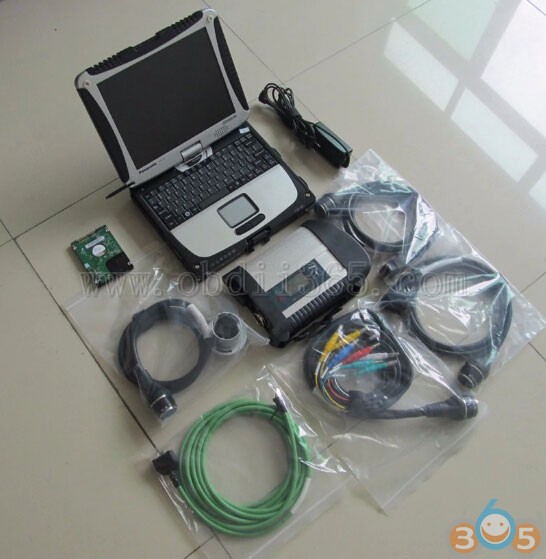
You are advised to have Xentry disk inside a second-hand Panasonic Toughbook CF-19, which comes with SD connect MUX.


The toughbook is old because the item is used before delivery and may have some signs of cosmetic wear, but is fully operational and functions as intended. But
It’s absolutely unnecessary to get a brand-new laptop for auto repair.
It’s easily get rubbed or destroyed when used it in real maintenance.
So, to get a second-hand but workable laptop will help SAVE A LOT.


With the Panasonic CF-19’s dedicated serial port, there is no issue for user…. it was plug and play… the HDD with Mercedes software is loaded into the Panasonic and WIS/EPC and XENTRY/DAS has been activated with “activation keys” before delivery…users can use it for Mercedes-Benz diagnostics, coding or programming with SD connect C4, when they receive the package.
mb-sd-c4-with-panasonic-cf19-1
mb-sd-c4-with-panasonic-cf19-2

mb-sd-c4-with-panasonic-cf19-3


Xentry Passthru vs. Xentry Diagnostics: Vehicle Coverage Differences

What is Xentry Passthru & What is Xentry Diagnostics?

“Xentry Pass Thru” and “Xentry Diagnostics” is the Mercedes-Benz brand’s diagnostics and repair solutions for the Independent Repairers carrying out servicing and repairs for euro 5 and 6 certified passenger cars and commercial vehicles

The software is used to process coding, programming and enable dependent control modules for euro 5 and 6 certified passenger cars and commercial vehicles
xentry-diagnostics


What’s the difference of Xentry Passthru & Xentry Diagnostics?

– different vehicle coverage:

Xentry Passthru works with all modules. The only difference is it only works with CAN modules and you can use any J2534 device with it. So 2006 and up vehicles.

Technically yes, but it is artificially restricted according to the StartKey you are assigned based off of your HWID number given to Daimler, which in the US is restricted to emissions related control modules before MY 2018.

But if you activate it with developer keys then you have access to all modules and all vehicles.
xentry-diagnostic-car-list
– different functions & features:

Xentry Passthru has nearly the complete diagnostic scope (quick test, basic diagnosis, flashing & coding control units, reading/deleting fault memory, guided and functional diagnosis, DAS4 services) with the exception of technical restrictions due to the Pass Thru devices:
Only single-channel quick test and functional diagnosis (therefore longer runtime)
Basic diagnosis only in XENTRY Diagnostics
Key programming and DAS4 services only in XENTRY Diagnosis


What Mercedes-Benz models are covered by Xentry Passthru?

Pretty much all can vehicles. Works great with Xentry vehicles. So I would say Xentry Passthru is good for 2006 and up.
Passthru Models are only from EURO5 Vehicles (for Europe)

Just get a dev key, should work on all models..

IMPORTANT: Xentry passthru does not supported this vehicles in DAS:

– Bharat Benz
– Foton
– Fuso
– LKW
– IMO
– Unimog
– PKW using HHT

Also, wont cover special function unless you use full size Stand Alone DAS.


What Mercedes-Benz models are covered by Xentry Diagnostics?

Xentry XODS can work with Mercedes-Benz Passenger car, van, truck, unimogs, buses, super sports cars, industrial major assembikes
xentry-xdos-car-list-1

xentry-xdos-car-list-2

xentry-xdos-car-list-3

xentry-xdos-car-list-4

xentry-xdos-car-list-5

xentry-xdos-car-list-6

xentry-xdos-car-list-7

xentry-xdos-car-list-8

xentry-xdos-car-list-9

xentry-xdos-car-list-10

xentry-xdos-car-list-11

xentry-xdos-car-list-12

Xentry Passthru Review by Real Users:

Tested Xentry Passthru 12.2017 with VAS5054A on C203 2003. all work without problem. on k line too.

I have used my VAS 5054a with 2006 Mercedes CLS55 AMG, 2007 R class, 2008 Sprinter, all in DAS. Everything worked except ignition sensing.
I used VAS5054A with 2014 C 250 using Xentry, everything works fine, no ignition sense, but Xentry gives you a checkbox to manually select.
I have not tried older than 2006 for Mercedes, but I am sure the limitation is in software/drivers.

It was more easy to make the VAS5054 work on 64bit than change Xentry
software to FULL work on 32bit.
xentry-j2534-windows-32-bit
The lower i have test before on 32bit was a W211-006 from 2002,
quick test on all units with VAS5054, and it may work with HHT-win
because it have KK-Line.
After some more test i will poste the solution for VAS5054 work as PassThru on 64bit.


Xentry Diagnostics Review: the latest XDOS 09.2018

i installed 2018–09 successfully.

Note that rollback symptom probably because of a prerequisite software that is failed to install.
try to install from scratch again and look carefully what is failed to install during prerequisite software installation.

if it happen, run xdos setup again or manually try to install the failed software.

usually microsoft visual c++ 2008
32bit
in x:\data\ISSetupPrerequisites\{0BE9572E-8558–404f-B0A5–8C347D145655}\vcredist_x86.exe
64bit
in x:\data\ISSetupPrerequisites\{8D61397C-2AD6–4210–8E43-C2793010DC35}\vcredist_x64.exe


Good to know: For newbies


The toughbook is old because the item is used before delivery and may have some signs of cosmetic wear, but is fully operational and functions as intended. But
It’s absolutely unnecessary to get a brand-new laptop for auto repair.
It’s easily get rubbed or destroyed when used it in real maintenance.
So, to get a second-hand but workable laptop will help SAVE A LOT.

With the Panasonic CF-19’s dedicated serial port, there is no issue for user…. it was plug and play… the HDD with Mercedes software is loaded into the Panasonic and WIS/EPC and XENTRY/DAS has been activated with “activation keys” before delivery…users can use it for Mercedes-Benz diagnostics, coding or programming with SD connect C4, when they receive the package.


3.21.2018

How to install 2017.12 XENTRY PassThru

Free download XENTRY Diagnostics EU & USA PassThru 2017-12
(thanks to cyburbia for the source)

What is Xentry Passthru:
Xentry Passthru is different from from regular Xentry openshell. Xentry passthru does not use SDconnect toolkit. When you launch the program it will give you a dropdown where you can choose which J2534 device (can be found at http://www.obdii365.com/) you want to use.

How to install XD PassThru 2017-12:
1. prepare windows sp1 x86 or x64
2. run setup.exe
3. copy xentry missing pictures
4. install block check keys to daimler server
5. install old key loader for configassist
6. install 2221-45 error fix
7. install 3.91 error fix
8. install das license 0 day fix
9. install passthru device driver
Do not need:
1. 32 Bit Installer fix
2. xentry and das blacklist
3. scn fix (i’m not sure)

Vehicles which are not supported in DAS:
– Bharat Benz
– Foton
– Fuso
– LKW
– IMO
– Unimog
– PKW HHT

XDPT system and data version
xdpt-data

XDPT
xdpt
FAQs – XENTRY PassThru installation tips:

Q: This and all PassTru versions works as good and as same as SD Connect C4 units?
A: – for Xentry, i check all diag files are identical with open shell.
– for DAS, it is not as complete as openshell with sd4. see note above.
passthru limited to obd2 vehicles only, pkw,transp, smart.
– passthru device can’t be used with v-ediamo and dts monaco.

Q: Is the full install file or just update file?
A: I think is full, is 21,3GB

Q: Will this version work for SCN Coding ?
A: yes, it should be. please try and give feedback.

Q: Need help with install.
4. install block check keys to daimler server
5. install old key loader for configassist
6. install 2221-45 error fix
7. install 3.91 error fix
8. install das license 0 day fix
9. install passthru device driver
A: 4. install block check keys to daimler server
edit C:\Windows\System32\drivers\etc\hosts
Code:
127.0.0.1       openshell.aftersales.daimler.com
::1             openshell.aftersales.daimler.com

or use this
edit appserv.ini in
program files (xxx)\mercedes-benz\appserv\appserv.ini
[301]
name=zbus
url=https://localhost

Q: I like to know, this is pass thru version is there a other version for diagnose for pass thru device???
so 1 dvd diagnose other dvd for programming?
A: only 1 dvd mate. Sdflash folder for programming is include in it.
the using of xentry passthru version is like the xentry open shell version only it is using passthru devices.

Q: Could you explain this a little more please? “4. install block check keys to daimler server”
A: from old crack:

Code:
C:\Program Files\Mercedes-Benz\xentry\fusoko\eclipse\plugins\
Rename File
From
com.daimler.xentry.diagservice_1.6.0.201608011018.jar
To
com.daimler.xentry.diagservice_1.6.0.201608011018.jar.DELETE
now its other version number
also block starkey center
host file:

Code:
127.0.0.1       openshell.aftersales.daimler.com
::1             openshell.aftersales.daimler.com

Ps, Credited to the contributor and participants in the thread from http://mhhauto.com/


http://blog.obdii365.com/2018/03/21/12-2017-xentry-passthru-download-free/

11.16.2016

How to change DAS XENREY start menu picture

It’s a customer interesting setup on changing a picture of MB Star diagnosis DAS XENTRY software interface. Here is what he shared for all:

“
I was playing around with DAS the other day, changing things when i came across a picture of Xentry
So i decided to change it and it worked…
I think you guys can change it so that it displays your shop logo every time you start DAS or picture that you like.
It takes couple of tries but once perfected it can be used on other systems as well
When you change it, just make sure it’s confined to standards such as

Code:
File must be in location C:\Program Files\Mercedes-Benz\DAS\bin
File name must be “XentryDAS 991×620.bmp”
File must be in “bmp” format or Bitmap image (.bmp)
Width must be 991
Height must be 620
”

The original Xentry DAS interface picture:
das-xentry-original-picture
2016.09V MB Star xentry das start picture after change:
xentry-das-start-picture-1
xentry-das-start-picture-2
(BIG thanks to CATAHA from cartechnology.co.uk)

11.04.2016

2016.9 Xentry fault occurred when change language

2016.9 MB Star diagnosis Xentry “A fault has occurred”  error solution.

Q: When I change 2016.9V Xentry software language, it displayed an error message “A fault has occurred”
2016.9 mb star xentry
A: Change laptop time/date to 2016.09.05.

10.09.2016

(Solved) Xentry 2015 2016 Timeout Error & Not Starting

This is the little fix for MB Star diagnosis SD Connect C4 Xentry 12.2015 or 03.2016 timeout error and not starting issues, which will automatically adjusts the pc date, launches the program, then 40 seconds later returns the correct date.

System ok:
Both Windows XP and Windows 7 O/S
Reason:
Too much to modify, the date is checked more than once during start up. Xentry 12/2015 and 03/2016 have a date lock on them to prevent them opening after 09/09/2016.
Fix to overcome the Xentry timeout error as of 12/15:
1- Free download XentryTimeout.rar and unzip:
(This fix automatically sets the date back, launches the program, then returns the correct date so the program can be run correctly. It also has a check to prevent it launching twice (which will trap the date at and incorrect setting) . It will also run just fine with the xp star shell in place.)
2- Copy start_Xentry.exe to the Xentry bin folder
3- Overwrite or rename the existing file

Note 1: this is version3, remodded to overcome asam3 error and add Xentry sim functionality

Note 2: in the windows control panel make sure short date format in “region and language” is set to dd/mm/yyyy or mm/dd/yyyy
Because this fix changes the system date automatically, Windows defender or other security programs may mistake it for a virus. Do not worry, it is perfectly benign, and will not harm your PC. Just add it to the exceptions list in your antivirus program.

9.28.2016

How to solve MB Star Xentry not start problem

Here is the working solution to MB Star diagnosis SD Connect C4 MUX Xentry not start problem shared bymbstartool.com customer.

Problem
I applied the key but 12.2015 Xentry is still not working.  How do I fix it?
xentry-startkey
When I run it I get the pop-up screen but nothing after…
xentry-not-start
I changed the laptop’s date as the software version but the problem is not fixed xentry will still not load.


Solved!
I have fixed the problem…
2.       Turn on VM, delete all lic_key in C:\Documents and Settings\All Users\Application Data\LicDir leave only lan.id DO NOT DELETE lan.id
3.       Set VM month/year to 12.2015
4.       Disable windows internet time sync in VM
5.       Reboot VM and check month/year should still be 12.2015
6.       Setup Xentry key in StarKey Manager, Xentry fixed