Showing posts with label mb star software. Show all posts

8.26.2024

How to Activate 2024.06 Benz Car and Truck Software?

 2024.06 MB Star diagnostic software was tested working fine with Super MB Pro M6+ and SD Connect C4 DoIP multiplexers. Since version 2024, MB has used separate Xentry diagnostic software for cars and trucks.  Obdii365.com here shows how to activate both 2024.06 xentry for cars and for trucks.


Software including:

Windows 10 64bit system, 256G SSD
Xentry/DAS 2024.06, Truck version 2024.07, support bus and trucks
WIS 2021.09
EPC 2018.11
StarFinder 2024/2016
PL76 Price List 2022.01
SDmedia offline 2014.01
Vediamo 5.01.01
DisassembyAssistant
Selit 14.i Trucks Service Literature
DTS Monaco 8.16.15/9.02
HHT-WIN


Part 1: How to Activate 2024.06 MB software for cars (Activate Xentry, WIS/EPC, Vediamo, DTS)

1). Activate WIS/EPC
Open “WIS-EPC”, enter user: admin, password: 12345

activate wis epc 1


Click on “Server” then “Edit the access authorization”.
If you cannot see LAN-ID (Unknown LAN-ID), you need to uninstall some drivers.

activate wis epc 2

activate wis epc 3
We usually uninstall these network adapter drivers. If you still cannot see LAN-ID, uninstall all network adapter drivers.

activate wis epc 4
If still no luck, reinstall the computer and try again or change a laptop.

If you can see the LAN-ID.
Send Lan-ID to us to generate WIS and EPC StartKey.

activate wis epc 5

activate wis epc 6
Then paste StartKeys to corresponding area to activate WIS and ECP software.

activate wis epc 7

After activating WIS/EPC, you can press this icon to reinstall those network adapter drivers.

activate wis epc 8

2). Activate Xentry for cars
Go to System->Mercedes-Benz->ConfigAssist
If ConfigAssist program cannot start automatically, go to Service and Applications->Services->Mercedes-Benz ConfigAssist, set ConfigAssit to Automatic type and Apply.
Then Start ConfigAssist program.

activate 2024.06 xentry for cars 1

activate 2024.06 xentry for cars 2

activate 2024.06 xentry for cars 3

Select device type as XENTRY Diagnosis VCI

activate 2024.06 xentry for cars 4
Cick log icon in ConfigAssist.
Copyhardware ID and send to us to generate StartKey for ConfigAssist

activate 2024.06 xentry for cars 5
Then copy and manually paste the StartKey.
Install StartKey successfully.

activate 2024.06 xentry for cars 6

Go to 2024.6CARS/ProgramData/LicDir folder, copy and paste lic_key_2.dat file to thesame folder.
Rename the copied file to lick_key_2.x4711 and make this file ready-only.

activate 2024.06 xentry for cars 7

activate 2024.06 xentry for cars 8

activate 2024.06 xentry for cars 9

activate 2024.06 xentry for cars 10
Run XENTRY Diagnosis software on the desktop
Copy and send Hardware ID to us to generate registration key.

Paste the key to activate Xentry for cars.

activate 2024.06 xentry for cars 11

activate 2024.06 xentry for cars 12
Then log in XENTRY with the username and password.

If you login with the default user name: xentry and xentry stuck, here is the solution

2024.06 Xentry Offline Login Account Blacklist Solution


3). Activate DTS
Run DTS 8.16 from the desktop.
Send hardware ID to us to activate DTS

activate dts monaco

For DTS 9.02, we don’t provide activation or database.


4). Activate Vediamo

Run Vediamo 5 and send Hardware ID to us to activate Vediamo engineering software.

activate vediamo


Part 2: How to Activate 2024.07 Xentry for Trucks

Go to system, select Daimler Truck->ConfigAssit

activate 2024.07 xentry for trucks 1

Press lock icon.

Copy and send us the Hardware ID to generate StartKey for ConfigAssit.

Then manually input the StartKey.

Install StartKey successfully.

activate 2024.07 xentry for trucks 2

activate 2024.07 xentry for trucks 3

activate 2024.07 xentry for trucks 4

Go to 2024.07TRUCK/ProgramData/LicDir folder, copy and paste lic_key_2.dat file to the same folder.

Rename the copied file to lic_key_2.x4711 and make it file read-only.

activate 2024.07 xentry for trucks 5

activate 2024.07 xentry for trucks 6

activate 2024.07 xentry for trucks 7

activate 2024.07 xentry for trucks 8

Run C4_VCI switch.exe and select device as C4 device.

activate 2024.07 xentry for trucks 9

Run Diagnostics Truck software on desktop

activate 2024.07 xentry for trucks 10

Run AfterStartKey.exe as administrator. This program must be run after the ConfidAssist.exe successfully configures STARTKey.

activate 2024.07 xentry for trucks 11

activate 2024.07 xentry for trucks 12

Run Diagnostics Truck software on desktop again.

Copy and send the Hardware ID to us to generate registration key.

Paste key to the corresponding area to activate xentry for trucks.

activate 2024.07 xentry for trucks 13

Then login xentry truck, user name: truck88 and password: 123456

activate 2024.07 xentry for trucks 14

Now truck software is ready to use.

activate 2024.07 xentry for trucks 15

www.obdii365.com

9.28.2022

MB Star HDD Failed to Download Language Pack Solution

 MB Star HDD (SS210-10)/SSD (SS210-A10B) is in English default, if you need to change system language but failed to download the language pack.

Here is the solution.
MB Star HDD Failed to Download Language Pack Solution 1
Open TOOLS folder on desktop
Open Windows Update Blockers-> Run Wub_x64
And Enable Update-> Apply Now
Download the system language pack again. 
MB Star HDD Failed to Download Language Pack Solution 2

MB Star HDD Failed to Download Language Pack Solution 3

https://www.obdii365.com/service/mb-star-hdd-fail-download-system-language-pack-solution.html

7.08.2021

Change Benz Speed Limit with Vediamo and DTS Monaco

 I want to unlock the Mercedes Benz factory top speed limit which is 250km/h. Which program can I use to unlock it? and how to remove the speed limit set from the factory? Check tutorials below:


Which program?

MB Star DAS/XENRTY: No

Vediamo: Yes

DTS Monaco: Yes


You could do them offline using Vediamo or Monaco but from an experience you better of with MB SD Connect C4 or VCI multiplexers to used those software. Meanwhile, you will need special CBf/Vsb/smr file or seed-key calculated to get the required access to the ecu and cpc. Some people can help you with that calculation. Unfortunately, we don’t.

In a word, you will need Vediamo/DTS together with the correct files (vsb w cbf) or regular file with seed key (bought) to gain access for coding.


Vediamo Guide

DTS Monaco Guide


How to change/disable speed limit (Vmax) on Mercedes with Vediamo?

Example on MED40 engine.

change-benz-med40-vmax-vediamo-1


In Vediamo software, select V Ecoute

change-benz-med40-vmax-vediamo-2

Upload a CBF file that you have saved on desktop

change-benz-med40-vmax-vediamo-3


Got the engine module on your car
For example on this car it is MED40,  (unlock me97 will not need calculator )
Right-click ECU and go to Properties

change-benz-med40-vmax-vediamo-4

Select interface,
Select ECU – manual command input

change-benz-med40-vmax-vediamo-5

We send the command 27 0B
open Seed Calculator

change-benz-med40-vmax-vediamo-6

We write 4 bytes and get the code to send

change-benz-med40-vmax-vediamo-7

change-benz-med40-vmax-vediamo-8

Press Generate to generate a key

change-benz-med40-vmax-vediamo-9

Copy and paste 4 bytes of the key and paste to vediamo

change-benz-med40-vmax-vediamo-10

change-benz-med40-vmax-vediamo-11

27 0C write code
Send command again
Access is open
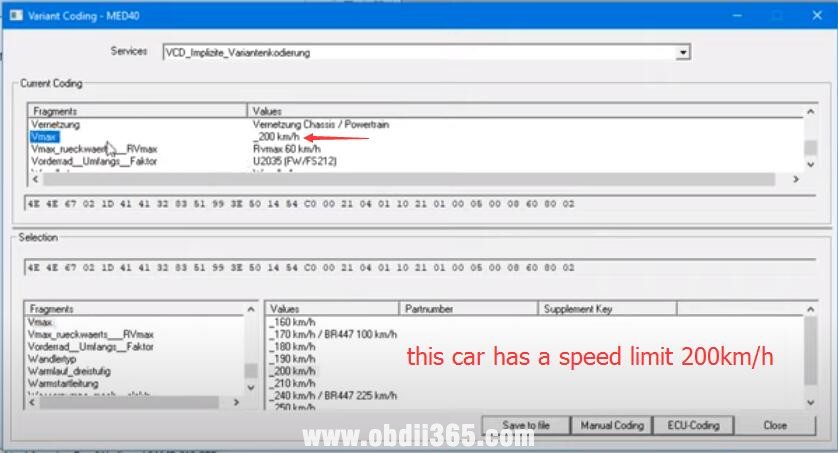
Go to Variant coding

change-benz-med40-vmax-vediamo-12

Select VCD- Vmax

change-benz-med40-vmax-vediamo-13

From the factory the car has a limit of 200 km/h

change-benz-med40-vmax-vediamo-14

We change the speed limiter to 250km/h, press ECU coding.

change-benz-med40-vmax-vediamo-15

Coding success. VMAX (Factory Speed Limiter) was changed.


If it is ME97 engine, the procedure is easier, does not require seed calculator.

Select ME97 engine
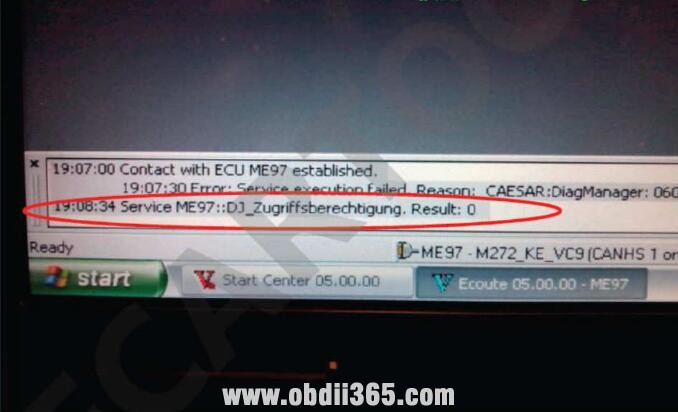
Click sub-options to select “Function”
Double click “DJ_Zugriffsberechtigung”
It will show access permission
select “Coding” option from menu,and then“Variant Coding”
Select “lmplicit_Coding_ME97”
Now select “Vmax”,and then select new max speed from right list

change-benz-md97-vmax-vediamo-1

change-benz-md97-vmax-vediamo-2

change-benz-md97-vmax-vediamo-3

change-benz-md97-vmax-vediamo-4

change-benz-md97-vmax-vediamo-5

change-benz-md97-vmax-vediamo-6


How to Remove Mercedes Speed Limit by DTS Monaco?

Example on ME97 ECU

1.You need t unlock ECU DiagJob–>Zugriffsberechtigung 1 and Zugriffsberechtigung 2

change-benz-vmax-dts-monaco-1


(click to enlage images)

2.Choose Domane “Implizite Kodierung ME97”

3.Choose desired value for Vmax

4.Kodieren

5.Hard reset

change-benz-vmax-dts-monaco-2


http://blog.obdii365.com/2021/07/08/change-mercedes-speed-limiter-vmax-with-vediamo-or-dts-monaco/