2.20.2022

How to Change Xentry App ID from 253 to 252?

 How-To: Install MB Star Diagnostic SD Connect C4 Xentry 2021-12 on Virtual Machine and change App ID From 253 to 252.


Firstly, a huge thanks to @webmaster, @gcs190, @pesona, @connector, @disinfetor, @cloud9atom, and many others who have helped us learn. 


HOW TO: Change Xentry App ID From 253 to 252 and Hide Virtual Machine

WHAT THIS FIXES: “No Access Authorization” on accepted Startkey, or Config Assist not accepting long key or short key StartKeys
  1. Go to your virtual image folder
  2. open notepad (Windows Key + R, “notepad“, enter.)
  3. Drag and drop your .vmx file for the image into notepad
  4. Add the following line at the end of the file: monitor_control.restrict_backdoor = “true”
  5. Save and close
  6. Open your Virtual Machine, goto to Xentry Config Assist et voila – your App ID is now 252!. You have prevented Xentry from detecting it is running inside a Virtual Machine

HOW TO: Properly Uninstall Old Versions of Xentry

WHAT THIS FIXES: Too many tools installed that are not compatible with each other. If Everything is a mess and you are unhappy
  1. Uninstall Xentry: Remove any old versions of Xentry through the windows uninstaller
  2. Clean up any old patches: by deleting Xentryapi.dll and/or Connector64.dll from C:\windows\syswow64 , C:\windows, C:\windows\system32 if exists
  3. Clean up registry: Windows+R key, “regedit”, enter. Navigate to HKEY_LOCAL_MACHINE\SOFTWARE\Microsoft\Windows NT\CurrentVersion\Windows and delete AppInit_DLLs and LoadAppInit_DLLs keys (they may have pointed to or referenced XentryAPI.dll or Connector64.dll)
  4. Clean up the previous keyguard: Navigate to C:\programdata\LicDir and make sure lic_key_2.dat is NOT set to Read-Only (right-click, properties on file). Delete lic_key_2.x4711 if it exists

HOW TO: Installing Xentry XPT 2021-12 in Virtual Machine VM:

WHAT THIS FIXES: Hopefully a Mercedes !! 
  1. If Not in VM: Disable Secure Boot in Bios
  2. If In VM: Modify VMX file as per above instructions (can be done anytime prior to using keygen)
  3. Download XPT or Xentry Files
  4. Install
  5. Run Fullfix v4 by @disinfetor in Administrator Mode (right-click the icon, run as admin)
  6. Restart PC
  7. Open Config Center, click next until Start Key Screen. Click Copy ID Button
  8. Right-click and Run as admin XentryKGdisMod – if given .dll not found error hit ok. Key will appear
  9. Go back to Config Center Screen, click manual, then paste using CTRL-V. Hit ok
  10. Choose your storage options (Deactivated etc.)


That’s it – you should now be able to start without “No Access Authorization”, No “2221-45 Error”, and No Login Screen all thanks to the work of multiple people on mhhauto forum and the disinfetor package!

Free download FullFix-Xentry-2021-12 v3

https://mega.nz/file/I4ZwGDJY#tcPmtlJmiFFzh8B-1AQvXK9-FI8L71LgN4yW2VYFTa8

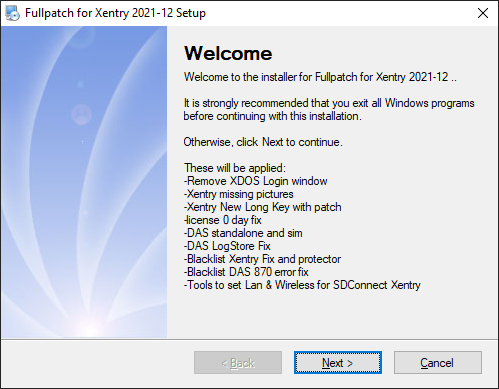
These will be applied:

-Remove XDOS Login window

-Xentry missing pictures

-Xentry New Long Key with patch

-license 0 day fix -DAS standalone and sim

-DAS LogStore Fix

-Blacklist Xentry Fix and protector

-Blacklist DAS 870 error fix

-Tools to set Lan & Wireless for SDConnect

Free download FullFix-Xentry-2021-12 v3

Please dissable antivirus. As it detects false positives.

changelog:
v4: fixed shortcut to the keygen.
v3: new modded xentry keygen with dll-patch and secureboot checker
v2: New modded keygen of xentry. Copy hwid to clipboard and run. The clipboard will be replaced with the key to be pased in xentry.

http://blog.obdii365.com/2022/02/20/change-xentry-app-id-from-253-to-252-and-hide-vm/

1.07.2022

Xentry Passthru J2534 Adapters and Test Report

 If you are looking for an J2534 interface that supports Xentry passthru and cost less then a MB SD C4/C5/C6 clone, these are popular j2534 passthru adapters.


  • vas-5054a
  • Openport 2.0
  • Mini VCI j2534
  • some other VCIs


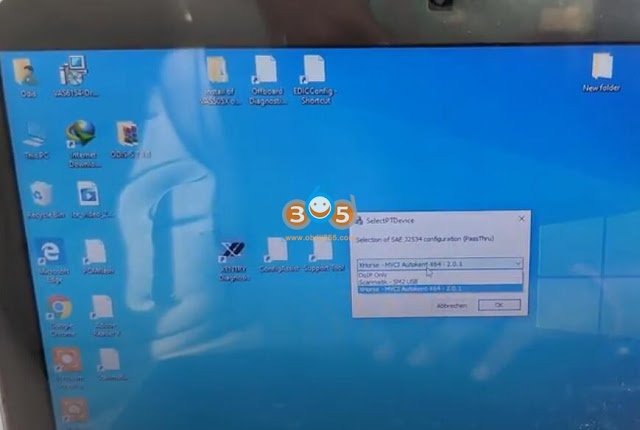
To have J2534 interface work with Xentry:

  • Ensure the tool supports SAE-J2534/2 drivers.
  • Also ensure to buy / download Xentry PassThru version.


5054a:

Buy VAS--5054A for 60$ and use Xentry Passthru.

The VAS5054 is a good tool. They've used it with Xentry Pass Thru, Forscan, Techstream and Nissan Consult.

Same stuff as C4 connect but way cheaper.

Free download J2534 VAS 5054A driver for Xentry


Openport 2.0 

Buy a tactrix Openport 2.0 original or clone

OpenPort 2.0 clone:

The OpenPort 2.0 is confirmed working with xentry passthru, one thing you should consider is that
1. you wont be able to access K-Line ECU's that are widely used in old models (W221, 220, 203, 211, 210)
2. i wouldnt trust that thing to be able to do ECU SW updates which can take hours cause you're risking of getting failed uploads and then potentially bricking your ecu
3. if you want to work with vediamo you can't use vediamo 5 (4 can't use smrd files) because vediamo 5 doesn't support Passthru so your "stuck" with DTS Monaco

so keep that in mind. but especially that these devices can be bought for 20-30$ makes them worth it imo at least to get into the whole system.

You'd better replace R1 by 47k for better operation and to avoid overheating.

Review

  1. I've installed Xentry Passthru 12.2020 and Tactrix Openport 2.0 CLONE. Successfully diagnosed W211. All modules are available including data and DTC reset functions.
    SBC and old ECU ME2.8 will not read. Other modules without a problem. The newer 211 (facelift) is also no problem. I can confirm this. Working 95 procent modules.
  2. DAS works fine, read modules, fault codes, erase, adaptation, reset control units on W639 Vito.
  3. XENTRY work fine and read 38-39 modules and fast comunication on W212. Output test, reset options, basic programming work fine.
  4. Xentry works fine, read 37 modules, fast data transfer on C205. Same features as W212.


Mini VCI J2534

You can even buy Toyota Mini VCI cable for 35$ and also use xentry passthru. Xentry is the same software that is used by dealer.  MINI VCI j2534 really works but you have to know that you can only do a scan. you can forget about programming but also the price between them is a big difference.

You need it to be connected to the virtual system and to have the drivers in it, Sometimes it is an option for the USB device to disconnect from the physical system and connect to the virtual one.

You can use mini vci, but you wont be able to access some modules and I dont think you will be able to access any car without CAN connection (dont quote me on that). I cannot access w203s, but 211, 204 works fine.
I can confirm that. I tested one and I couldn't access to all modules on W212.

From maybe 37 modules it accessed just 17 modules.

xentry passthru j2534 mini vci 1

xentry passthru j2534 mini vci 2

xentry passthru j2534 mini vci 3

xentry passthru j2534 mini vci 4

xentry passthru j2534 mini vci 5

xentry passthru j2534 mini vci 6

xentry passthru j2534 mini vci 7

xentry passthru j2534 mini vci 8

vas-5054a and Openport would be better choices. Openport sees more modules.

Tested two cables with a Mercedes:

W207:
Toyota Mini VCI Cable: 26 Modules
OpenPort 2.0 China Clone: 50 Modules

Both cables worked with:
Xentry Passthru 06.2021
Vediamo 4.02.02
Windows 10 x64

Not able to get passthru for Vediamo 5.01.01 at this time as it was not supported.


Xentry Passthru J2534 Collections and Test Report:


1) DICE (Volvo_VCI)
- Battery : OK
- Duration of the 5 steps : 1 min 44 sec
- Reading the control units : 22 Modules

2) Openport 2.0 (replace R1 by 47k for better operation and to avoid overheating)
- Battery : OK
- Duration of the 5 steps : 0 min 57 sec
- Reading the control units : 41 Modules

3) VAS 5054A
- Battery : NO OK
- Duration of the 5 steps : 0 min 55 sec
- Reading the control units : 41 Modules (for controller SAK or SAF-XC161CJ-16F40F)
- Reading the control units : 32 Modules (for controller SAK-XC167CI-XXXX)

4) Mini-VCI for Toyota (generic)
- Battery : NO OK
- Duration of the 5 steps : 2 min 10 sec
- Reading the control units : 20 Modules

5) Scanmatik
- Battery : OK
- Duration of the 5 steps : 1 min 01 sec
- Reading the control units : 41 Modules

6) Scanmatik 2 Pro USB
- Battery : OK
- Duration of the 5 steps : 0 min 51 sec
- Reading the control units : 50 Modules

7) Scanmatik 2 Pro Bluetooth
- Battery : OK
- Duration of the 5 steps : 2 min 41 sec
- Reading the control units : 50 Modules

8) GM MDI
- Battery : OK
- Duration of the 5 steps : 1 min 05 sec
- Reading the control units : 41 Modules

9) BOSCH KTS 560
- Battery : OK
- Duration of the 5 steps : 1 min 05 sec
- Reading the control units : 33 Modules

10) Mongoose Pro
- Battery : OK
- Duration of the 5 steps : 1 min 13 sec
- Reading the control units : 41 Modules

11) Dialink J2534 (blue case, with STM32F105 controller)
- Battery : OK
- Duration of the 5 steps : 41 sec
- Reading the control units : 41 Modules

12) VCM II (Ford/Mazda)
- Battery : OK
- Duration of the 5 steps : 1 min 05 sec
- Reading the control units : 41 Modules


13). Bosch KTS520

with firmware update.
DAS works fine, read all modules and functions. Live Data/Outputs test not good! Tested on W245, A168, A169

XENTRY doesn´t work on W212 and C205, after read the VIN, the software going out sad


14). Eucleia Wiscan T6

T6 passthru tested with Das/Xentry 03.2020 in Smart 451 EV.
Battery voltage OK.
Fast communication.
Adaptation, Specials functions and programming Works.

Eucleia T6 Passthru tested on w204 and w212.

Fast diagnostic, all modules tested. Adaptation, basic settings and Online SCN works.

Eucleia T6 Passthru tested on w221. Fast diagnosis, adaptations, reset and programming doors control units.

Eucleia T6 passthru: Tested on W176. Update Transmission control unit with Xentry Online. Fast and Safe.


We don't provide software, driver for cheap j2534 with xentry. If need xentry for c4/c5/c6, check here.

https://www.obdii365.com/wholesale/sd-c4-c5-c6-diagnostic-tools/


http://blog.obdii365.com/2022/01/08/benz-xentry-passthru-with-mini-vci-openport-or-5054a/
11.08.2021

Vediamo Code Mercedes W212 W204 X204 Turn Signal

 How to use MB  Star diagnostic Vediamo engineering software to code Mercedes W212 W204 X204 Turn Signal successfully.


Look, the turn signal flashes 3 times.

Vediamo Code Mercedes W212 W204 X204 Turn Signal  1


Now we are coding with Mercedes Benz Vediamo so that the turn signal blinks 4 or 5 times. Firstly connect a Mercedes diagnostic tool (i.e MB SD C4C5Benz DoIP C6 etc) to the car.

Vediamo Code Mercedes W212 W204 X204 Turn Signal 2

Vediamo Code Mercedes W212 W204 X204 Turn Signal 3

ECU Properties and then click on the three options to confirm the reset.

Vediamo Code Mercedes W212 W204 X204 Turn Signal 4

Vediamo Code Mercedes W212 W204 X204 Turn Signal 5

Vediamo Code Mercedes W212 W204 X204 Turn Signal 6


Click on “Coding” and then “Variant Coding”.

After selecting the options (shown as below), click on “ECU-Coding” and then “Continue to ensure the software calibration number (SCN) will be reset at some ecus when writing the varcode.

Vediamo Code Mercedes W212 W204 X204 Turn Signal 7

Vediamo Code Mercedes W212 W204 X204 Turn Signal 8

Vediamo Code Mercedes W212 W204 X204 Turn Signal 9

Coding complete, click on “exit ECU” of Vediamo software.

After coding, the turn signal flashes 4 times.

Vediamo Code Mercedes W212 W204 X204 Turn Signal 10


www.obdii365.com

11.01.2021

Enable Mercedes Remaining Fuel in the Tank with Vediamo

 Today, I will show you how to use Benz Vediamo engineering software to turn on the function of the remaining fuel in the tank on a Mercedes W212, W204, X204, W218 etc.


Plug a Mercedes Benz diagnostic tool (i.e MB SD Connect C4C5, Benz DoIP C6 etc) to the car.

Enable Mercedes Remaining Fuel in the Tank with Vediamo 1


Prepare to Enable Hidden Mode Remaining Fuel in the Tank in Liters.

Enable Mercedes Remaining Fuel in the Tank with Vediamo 2


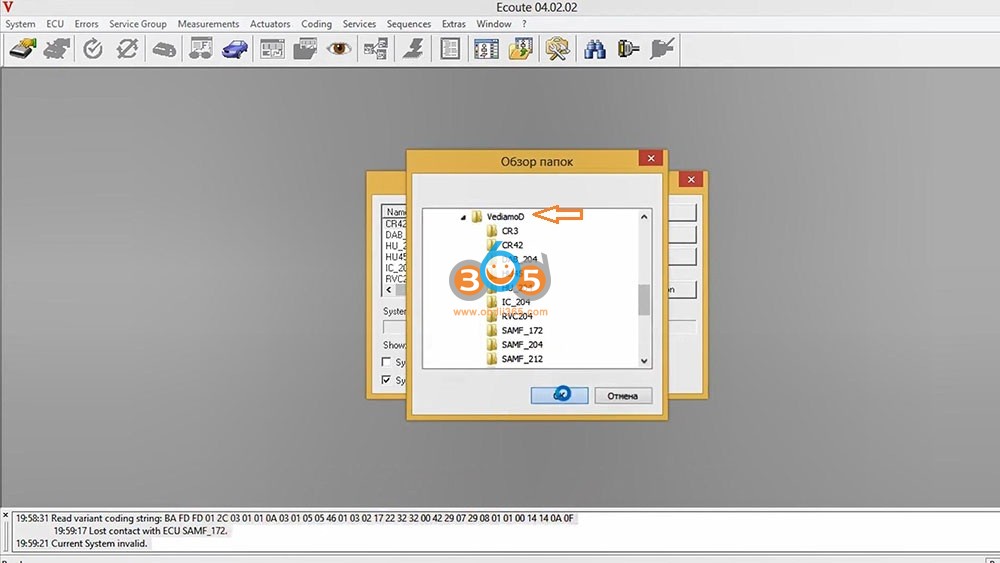
After installing Vediamo engineering software, open the “Start Center 04.02.02”, then click on “Vecoute”.

Enable Mercedes Remaining Fuel in the Tank with Vediamo 3

Enable Mercedes Remaining Fuel in the Tank with Vediamo 4

Enter “System Selection”, tick off ” System based on DIOGENES data (.cbf files), and then click on “Change Folder”, then “VediamoData”, then “Vediamo” and “Ok”.

Enable Mercedes Remaining Fuel in the Tank with Vediamo 5

Enable Mercedes Remaining Fuel in the Tank with Vediamo 6

Choose “IC_204”, the list of CBF file for other models will be here:

BF IC204 – Mercedes W212 (E), W204 (C), X204 (GLK), W197 (SLS), W218 (CLS)

CBF IC213 – Mercedes W205 (C) facelift, W217 (CL) facelift, W222 (S) facelift, W213 (E), W238

(CLS), X253 (GLC) facelift, W257 (E Cabrio), W463 (G)

CBF IC177 – Mercedes W177 (A), W118 (CLA), W167 (GLE), W213 (E) facelift

CBF IC222 – Mercedes W205 (C) preface, W217 (S Cabrio) preface, W253 (GLC) preface,

V222 (maybach), C190 (AMG GT), W447 (V)

CBF IC172 – Mercedes W463 (G), W166 (GLS/ML), W292 (ML), W176 (A), W246 (B), W156 (GLA),

W117 (CLA), R231 (SL), R172 (SLK), X204 (GLK)

Enable Mercedes Remaining Fuel in the Tank with Vediamo 7


Click on the third icon (in red circle below) and then “ECU” option to select “Manual Command Input…”

Enable Mercedes Remaining Fuel in the Tank with Vediamo 8

Enable Mercedes Remaining Fuel in the Tank with Vediamo 9

Input “22 01 08” under request message (Hexadecimal), then click on “Send”.

If here you have 20, 30, 40 etc. then this function is disabled for you.

Enable Mercedes Remaining Fuel in the Tank with Vediamo 10


To write the code and enable the function, 2E and add 2 (that is, there will already be 32).

Enable Mercedes Remaining Fuel in the Tank with Vediamo 11

Enable Mercedes Remaining Fuel in the Tank with Vediamo 12

Expand menu of ECUs.

Enable Mercedes Remaining Fuel in the Tank with Vediamo 13


Click on the fourth icon “Exit ECU contact”.


Next step is to back to the car, insert the key into the ignition and turn on.

Enable Mercedes Remaining Fuel in the Tank with Vediamo 14

Ok, job is done! This is a very useful feature.

Enable Mercedes Remaining Fuel in the Tank with Vediamo 15


Good to know:

MB SD C4, C5Benz DoIP C6 all comes with Vediamo engineering software.

http://blog.obdii365.com/2021/11/01/vediamo-enable-hidden-mode-remaining-fuel-in-the-tank-on-mercedes/

10.13.2021

How to Change 6/2021 DAS Xentry Win10 Language?

 Topic: How to change the language on 6/2021 DAS Xentry windows 10. Here are all the steps to follow, hope it helps. FYI, DAS / Xentry default language is English when you open the software.


obdii365.com engineer replied:

  1. The method to change DAS language: right click on “DAS” icon, enter “Properties”, then if you can see the file name with “-LXX (XX means the language Abbreviation) and then directly change XX as the language you need ( for example: EN, FR, DE, IT, RU, etc)


  1. The method to change Xentry language:

Enter the Xentry software to change.


What about users’ working method?

If anyone downloaded pre-installed Xentry VM or they just want to change the language selected at initial install, you can do it the following way:


1) Go to Start Menu > Run
2) Type in “regedit” and enter
3) Navigate to

“HKEY_LOCAL_MACHINE\SOFTWARE\WOW6432Node\Mercedes-Benz\Settings”
4) Change the binary “Language” key value to EN, FR, DE, IT, RU, etc or whatever language code you want
5) Navigate to

“HKEY_LOCAL_MACHINE\SOFTWARE\WOW6432Node\Mercedes-Benz\Installation Framework” above it
6) Change the “DAI_Language” key to the same language code
7) Close regedit and reboot.

This will globally change the language for your installation in SD Connect, AddOn Center, ConfigAssist, etc but you will still need to change the language in Xentry through the menu’s inside the program.


Might be different on different OS’s but I think the key names should be the same. Changing the shortcut with the “-len” extension didn’t work for me. Hopefully it will help someone else in the same situation!


Moreover:

If you also need to change all windows 10 in English use sysprep.exe in c windows system sysprep sysprep.exe
all next next next just select language English and when asks for user give it default as name and no password
after install you can delete the user default.

change 2021/06 xentry language

Question: I want to change the language on 6/2021 DAS windows 10.

I followed the above steps, it did not work, also the short cut does not have “|en” at the end of the command line to change the language.


Possible reason and solution:

first you need to change the language on the Xentry setting and open DAS via xentry.


Or I think what worked for me is by changing the system locale to English, not only the windows display language.


Alright, if you have any issues on 2021.06 DAS Xentry software running with MB SD C4 DoIPBenz C6C5 etc, contact at https://www.obdii365.com/ (Whatsapp:+86 18259252285) for assistance.

9.29.2021

DTS Monaco Review on a Mercedes W213

 I bought the MB Star SD Connect unit, Xentry SSD, and lapptop kit $719 everything included from obdii365.com. Clear any codes you want and a bunch of other awesome features like reset adaptions, fuel mix…and gazillion other features. I also managed to program a few features on my W213 (2018 model) with the DTS Monaco program. See below.

DTS Monaco Review on a Mercedes W213 1

This is for option 866. Allows you to download the comand touch app from Euro Apple store and control features from back of vehicle using ipad.

DTS Monaco Review on a Mercedes W213 2

Intelligent Headlamps. Must code both headlamps also.

DTS Monaco Review on a Mercedes W213 3

This feature allows you to control the back and bottom cushion temperatures.

DTS Monaco Review on a Mercedes W213 4

This is standard on newer E class cars but mine did not have it active. Setting these “moods” controls the scent, led lighting, seat temperature, and massaging.

DTS Monaco Review on a Mercedes W213 5

This feature lets your car sleep for a long time. Perfect for long trips away from home to prevent the battery from dying.

DTS can do a few more things, especially to turn off the seatbelt warning, and to display the temperature in Celsius. Fairly easy to do.

I would definitely recommend getting the mb sd c4 kit instead of a generic system.

http://blog.obdii365.com/2021/09/29/mercedes-w213-2018-retrofit-with-mb-sd-c4-dts-monaco/

9.28.2021

Benz 2010 ML350 Bad MAF Solved by MB Star Xentry

 Problem:

My Mercedes Benz 2010 ML350 Bluetec is going crazy again. Fix one issue and another comes up in a matter of weeks. Annoying!

So now I have some intermittent acceleration issues, as well as intermittent rough idling. Also have horrible mpg.

I am suspecting a vacuum leak. When I accelerate, I can hear a whistling sound. I can also hear a "whoosh" air sound when I accelerate with the windows down.

I scanned with Autel AP200 and got the following codes:


- 146100 Control deviation is too large (Current)

- 111500 The regeneration frequency of the diesel particulate filter is not ok. (Stored)

- 14B200 A plausibility error exists in the component 'hot film Mas airflow (MAF) sensor'. (Current & Stored)

- 123900 Charge pressure is too low (Stored)

- 153600 An internal fault exists in the component 'Nitrogen oxide (NOx) sensor upstream of the selective catalytic reduction (SCR) catalytic converter. (Stored)

- 16F700 Disregard this fault. (Current)

I cleared these codes and 16F700 is the only one that comes back immediately. 146100 and 14B200 and 123900 come back in a couple of days to a couple of weeks. 153600 comes and goes on its own. 111500 typically goes away until I force a regen (The dpf seems to be getting more soot faster since these issue began, so sometimes I force a regen to clear the soot).

I'm building a smoke machine to test for vacuum leaks based on YouTube videos. However, I'm new to engines so I have no idea what hose in the engine to plug in the smoke machine for a smoke test. I believe there are different components... exhaust, intake, and others. Please if you know about this, let me know where I have to plug in the machine to smoke test each component.

I removed the silver pipe and examined the green seal and it looks fine, but I replaced it anyway. I examined the other seal for the black plastic pipe that connects to the silver pipe, and that seal was pretty much destroyed. I replaced it thinking I had found the problem, but the car is still giving the same intermittent issues. I'm going to check it again to see if the seal isn't seating right. That particular pipe just seems a little loose to me even after I tighten the clamp screw.

Solution:
For anyone who might have a similar issue, here's how I solved it:

After replacing the water pump, I found a guy that fixes alternators and he restored mine. Reinstalled it and got the car started.

After that, I was finally able to get a hold of MB SD C4 Xentry/DAS. I ran a number of tests on the air/vacuum system with DAS, especially the MAF sensors and Boost. All tests passed with flying colors so that convinced me that none of the components were faulty.

Next step was adaptations. I reset pretty much everything that has to do with the air/boost system. Apparently, you even have to perform a reset after replacing your air filters, and I had replaced mine twice before without ever performing a reset!

After all adaptations/resets with DAS, the car seems to be back! Moral of the story is to get your hands on Xentry ASAP! If you own a Mercedes and are into DIY, Xentry is simply a must have. I am now a believer.